Slidely AI is our recommendation for teams that create and maintain PowerPoint presentations. Prezi is a compelling alternative for visual storytelling, designer-led starting points, and presentations built around a zooming overview. This comparison covers 20 practical questions, from the initial brief to the final handoff. For enterprise buyers, we examine SOC 2, GDPR, access controls, private deployment and model choice rather than treating a general security claim as sufficient proof. Prezi screenshots reviewed and supporting documentation checked on 24 September 2026.
Prezi vs Slidely AI at a glance
 Slidely AI Slidely AI | ||
|---|---|---|
| Best for | Visual storytelling, designer choices and zooming presentations | Our pick for ongoing business PowerPoint work |
| Where you work | Browser creation, presentation delivery and offline options | Web plus PowerPoint add-in on Windows and Mac |
| Starting from source material | PPTX, PDF and image references in the example | Bring reference files and your PPT design source together |
| Storyline and research | Audience and outline planning; enrichment shown without citations | Clarify the brief and review content and sources before design |
| Company templates | Import choices and team brand styling | Build around your company PowerPoint layouts and styling |
| AI editing | Chat-based changes within the Prezi editor | Revise existing PowerPoint content through conversation |
| PowerPoint output | PPTX export; native object editability not established | Continue working with native editable PowerPoint content |
| Enterprise and security | SOC 2 Type 2 report available to eligible subscribers under NDA; GDPR guidance, SAML SSO and team controls. Private VPC and customer LLM options not verified here | Published SOC 2 Type 2 and GDPR assurances; VPC deployment and organizational LLM options for enterprise evaluation |
| Google Slides | PPTX handoff; no native editing workflow established | Built for PowerPoint; no native Google Slides add-in advertised |
| Free plan | Basic free tier; public content and usage limits shown | Start with a limited ongoing free plan; add-in trial applies |
How we compared Prezi and Slidely AI
We reviewed the Prezi and Slidely workflows illustrated in this article. We also checked Prezi documentation for features the screenshots do not show. Slidely wrote this comparison for teams that create and keep editing PowerPoint files. The examples are not a controlled test of slide quality or speed. The scores reflect our judgment of how each workflow fits that job.
Presentation creation
1. How easy is it to give the AI your source material?
2. Can the tool research and enrich the presentation?
3. How well does it plan the storyline and slide content?
4. Can you control the design direction before generation?
5. Can it create editable, data-dense slides for PowerPoint work?
6. How fast and flexible is the creation workflow?
Branding, templates & design
7. Can it use your real company template?
8. Can it learn and reuse your company's design patterns and preferences?
9. Can it help when you do not already have a usable template?
Editing, data & PowerPoint productivity
10. How well can it edit existing slides with AI?
11. How well can it redesign one or multiple slides?
12. Can it re-template slides into a new design system?
13. Can it review and fix consistency across the whole deck?
14. Can it find and improve visual assets?
15. Does it keep everything natively editable in PowerPoint?
16. Does it provide advanced PowerPoint productivity tools?
Platform, user experience & enterprise
17. Where can you use the product?
18. How accessible are pricing and human support?
19. How well does it support enterprise deployment, model control, and security?
20. Can it work with ChatGPT, Claude, and other AI assistants?
Presentation creation
The first part of our comparison looks at everything that happens before a finished deck exists: giving the AI context, researching the topic, developing the storyline, aligning on the design direction, and finally turning all of that into slides.
1. How easy is it to give the AI your source material?
A useful input workflow should distinguish the evidence for a presentation from its visual template. A report supplies facts; a company deck supplies design rules. The key question is how clearly the tool lets you provide both.
Prezi
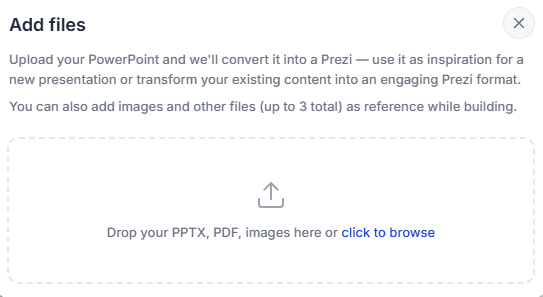
Prezi’s Add files screen accepts PPTX, PDF and images, with up to three reference files in the illustrated workflow. Users can convert an imported PowerPoint into Prezi or use it as inspiration.
Slidely AI
Slidely AI accepts documents, slides and spreadsheets as references, alongside an uploaded PowerPoint design source. That lets a team provide its brief, supporting data and branded deck together, then review how those inputs are used during planning.
Our take
Slidely for a PowerPoint brief and template; both support content inputs.
Both tools accept source material. Slidely is our preference when reference documents, spreadsheet data and a company PowerPoint design source need to guide the same project. Prezi suits teams that want to bring existing material into its presentation environment.
2. Can the tool research and enrich the presentation?
The files a user provides rarely contain all the context needed for a strong presentation. External information can completely change the interpretation of the internal data. A company growing at 20%, for example, looks very different if its market is growing at 10% versus 40%.
Research is useful only when the reader can verify it. We compare where external information enters the workflow and how easily a reviewer can check the supporting sources.
Prezi
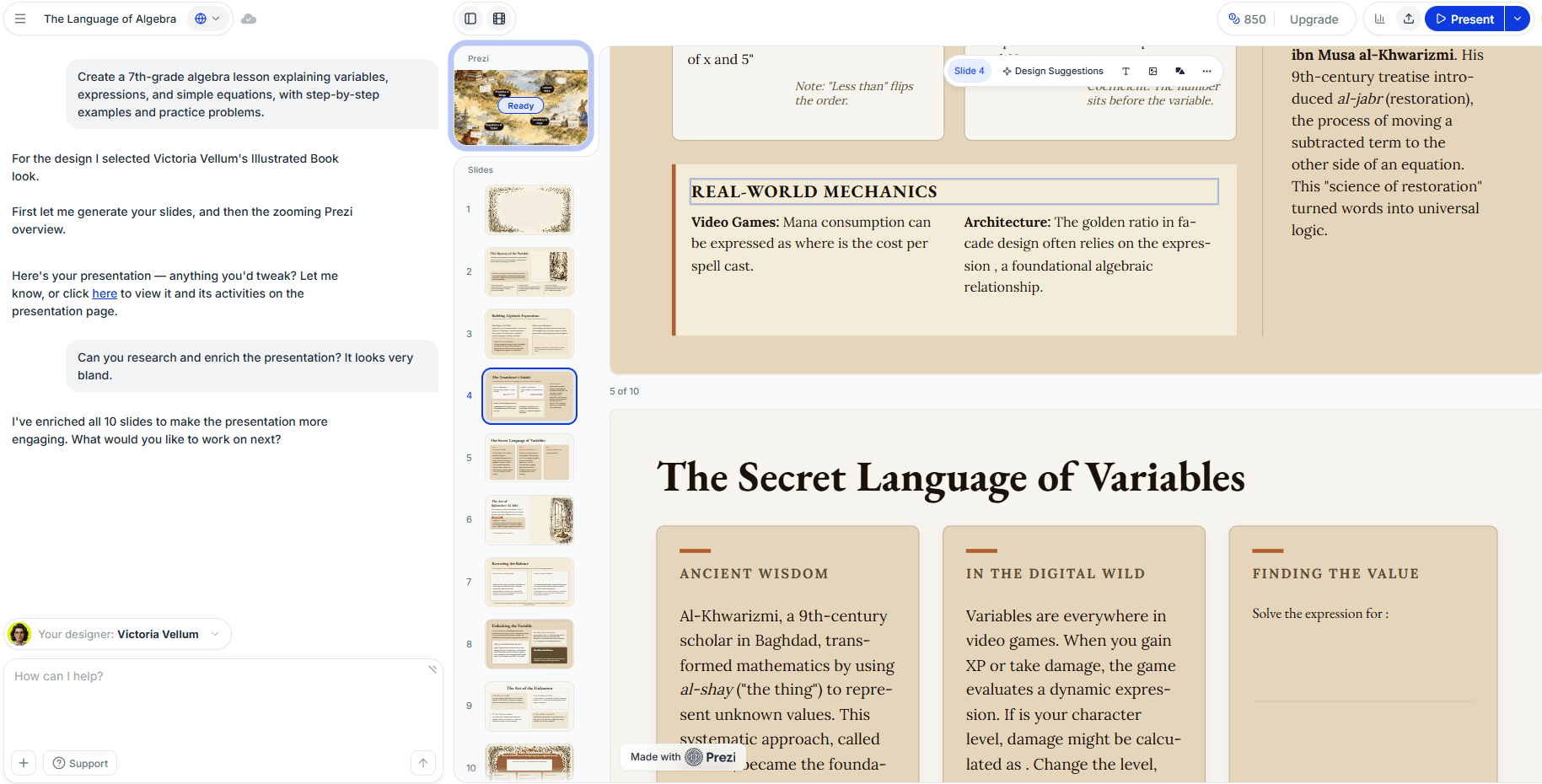
In the example, the user asks Prezi to research and enrich an algebra presentation. Prezi reports enriching all ten slides, and the visible content includes examples and historical context. This demonstrates content expansion, but the screenshot does not show web searches, citations or source review. Enrichment alone does not establish verified research.
Slidely AI
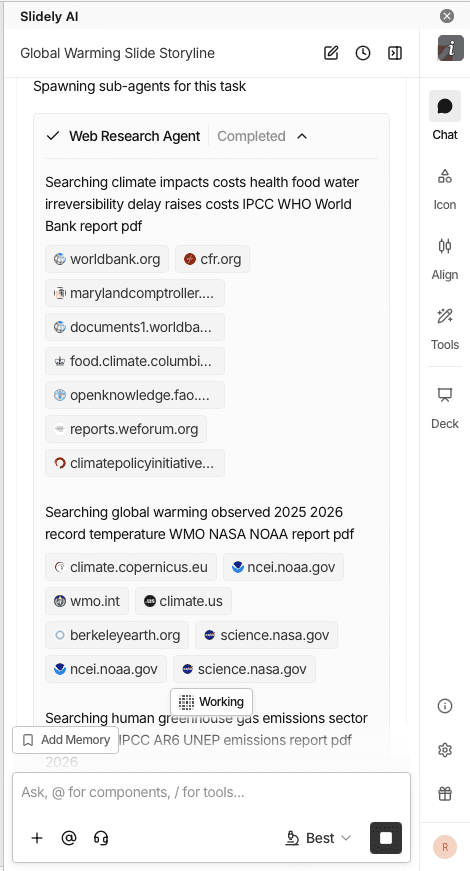
Slidely AI includes web search in its creation workflow and provides source links for review. Users can examine slide content and citations before proceeding with generation.
Slidely lets you review the evidence alongside the planned slide content before committing to the design. Check the source date, geography and definition of each metric at that stage, when correcting the argument is easiest.
Our take
Slidely for reviewing research sources during planning.
Prezi’s example shows a useful way to expand a presentation. We lean toward Slidely when the argument depends on external evidence that must be checked before design begins. The screenshots do not establish whether Prezi’s added claims came from live research or which tool is more accurate.
3. How well does it plan the storyline and slide content?
A good presentation is not simply a document broken into slides. Before designing anything, the creator needs to decide who the presentation is for, what the audience should take away, how the argument should unfold, and what evidence belongs on each slide.
The comparison here is about opportunities to review the argument before generation, rather than whether either product can produce an outline.
Prezi
Prezi’s creation screen lets users specify a topic, slide count and audience. Its AI FAQ also describes reviewing and customizing an outline before generation. That gives users an outline to review before generation. The Prezi examples do not show follow-up questions that clarify the brief.
Slidely AI
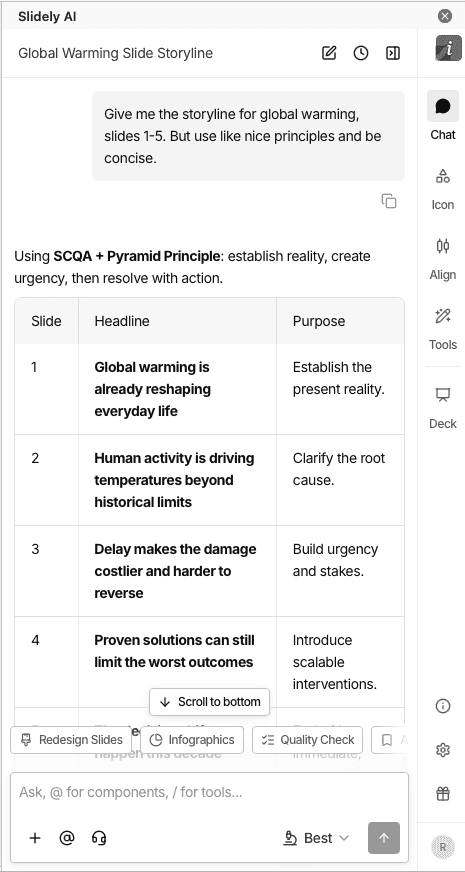
Slidely AI asks clarifying questions about the brief and supports review of the storyline and planned content for individual slides.
Use that stage to settle the audience, recommendation and supporting evidence. It is easier to correct a missing argument before investing in slide design.
Our take
Both support planning; Slidely for a detailed PowerPoint brief.
Prezi provides a practical route from a topic and audience to an outline and presentation. Slidely’s clarifying questions and slide-content review are our preferred fit for a complex business brief. The distinction is the depth and fit of the planning workflow, not whether Prezi can organize a story.
4. Can you control the design direction before generation?
Even if the storyline and data are correct, there are many ways to visualize the same presentation. Discovering that the AI chose the wrong design direction after generating 30 or 50 slides creates unnecessary rework.
We therefore looked at how much control users have over layouts and visual direction before the full deck gets generated.
Prezi
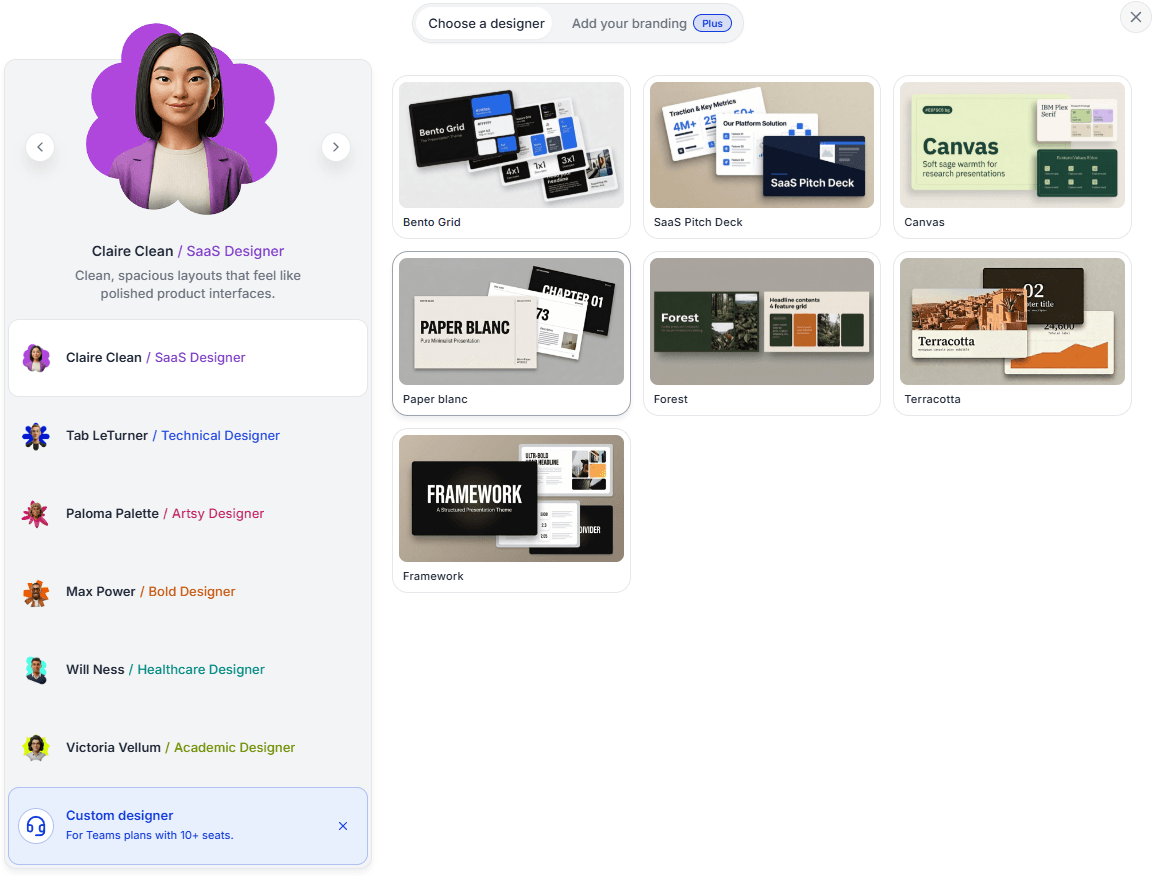
Prezi’s designer picker offers distinct visual approaches, including clean SaaS, technical, artistic and academic styles. The selected designer exposes several themes, while the screen also offers branding and a custom-designer option for qualifying Teams plans. Users can therefore set a meaningful design direction before generation.
These starting points are a strength when a team wants visual guidance. They do not, by themselves, establish exact preservation of a company’s PowerPoint masters and layouts.
Slidely AI
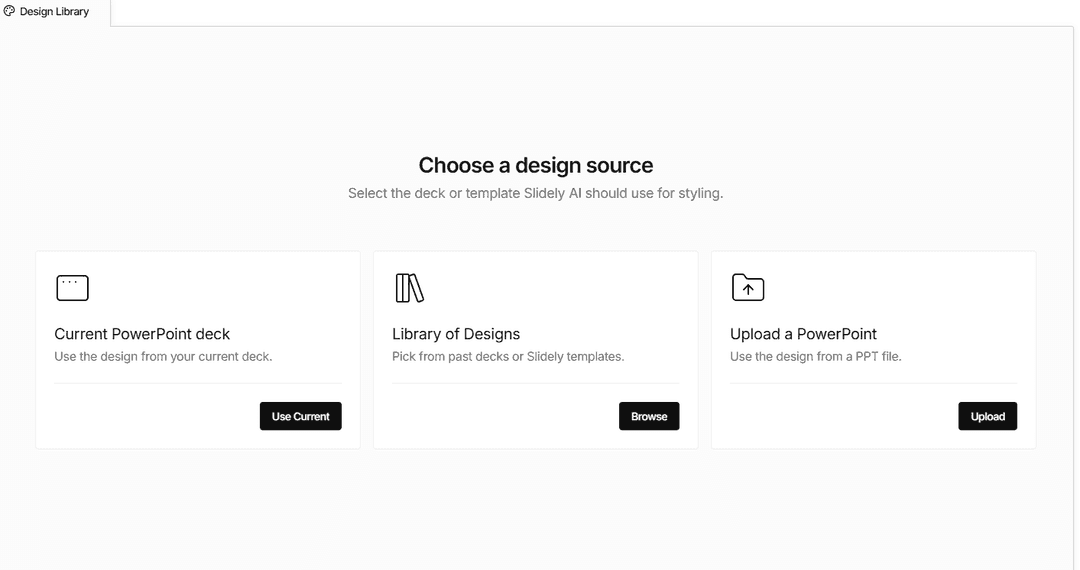
Slidely AI can use layouts from an uploaded PowerPoint template and lets users review layout choices alongside slide content.
This is useful when a team already knows which company layouts are appropriate for evidence, recommendations and detailed exhibits.
Our take
Tie: Prezi for visual starting points; Slidely for company PowerPoint layouts.
Prezi makes it easy to explore different presentation styles before creating the deck. Slidely is our pick when the visual direction must come from a specific corporate PowerPoint file. Choose according to whether the team needs a new visual approach or continued use of established PowerPoint layouts.
5. Can it create editable, data-dense slides for PowerPoint work?
Business presentations often need charts, tables and detailed notes on the same slide. For teams that keep working in PowerPoint, those elements also need to remain editable. We reviewed the illustrated workflows for that use case. We did not run a controlled test of visual quality.
Prezi
Prezi can include charts, but the material reviewed here does not show a dense analytical slide that we can compare with the Slidely example. We did not test how well Prezi handles complex data or whether its exported chart objects remain editable. Teams with spreadsheet-heavy exhibits should test those steps with their own files.
Slidely AI
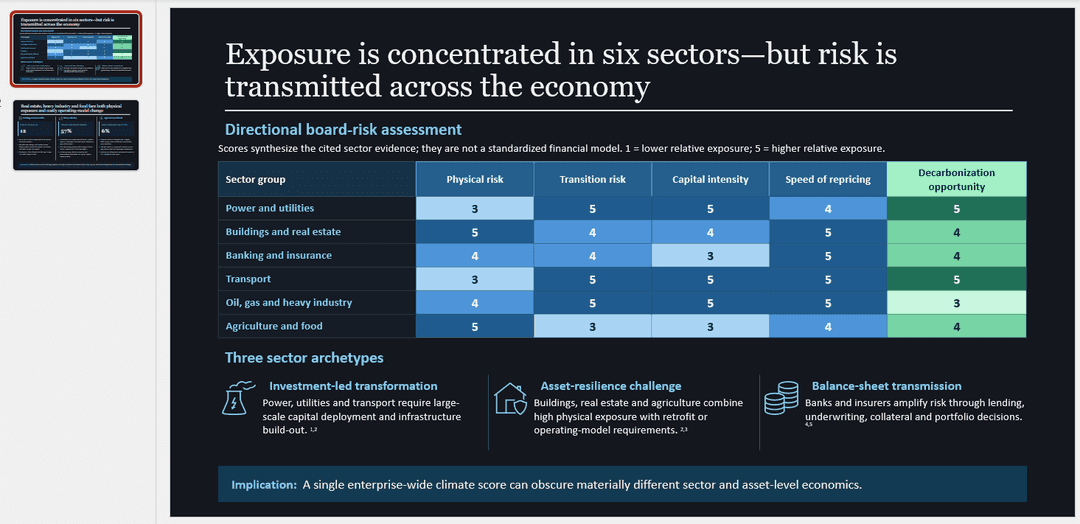
Slidely AI generates editable PowerPoint charts, tables and shapes. The illustrated slide contains several layers of information.
Editable charts, tables and shapes let your team keep refining the exhibit in PowerPoint. Review the values and source references as part of the normal approval process.
Our take
Slidely AI is our pick for dense PowerPoint slides that need further editing.
Slidely’s native PowerPoint objects suit detailed exhibits that need continued revision. Prezi can present charts and metrics, but the material reviewed here does not show a comparable editable PowerPoint exhibit. We prefer Slidely for this PowerPoint workflow without claiming that we measured overall slide quality.
6. How fast and flexible is the creation workflow?
Generating a long presentation still takes time with any AI system. What matters is not only the absolute generation time, but whether the product keeps the user blocked while work is happening.
A useful comparison measures time to an approved deck, including review and repairs. Generation time alone is not enough.
Prezi
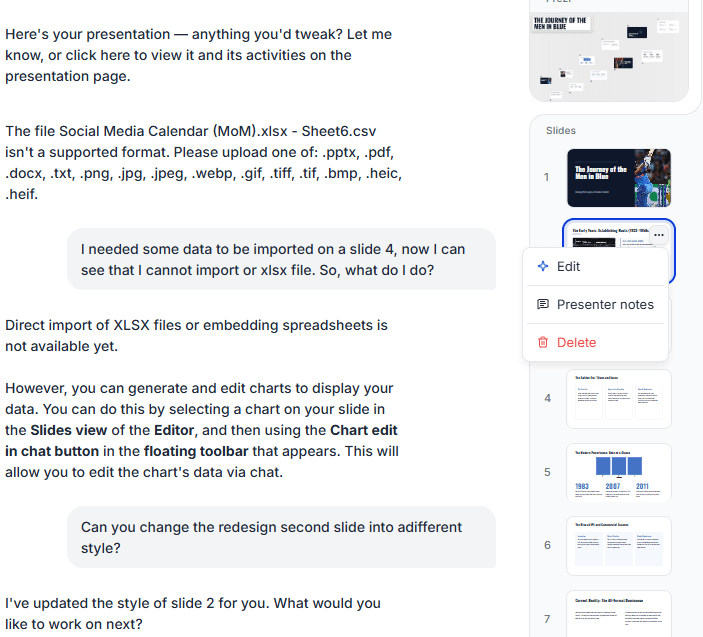
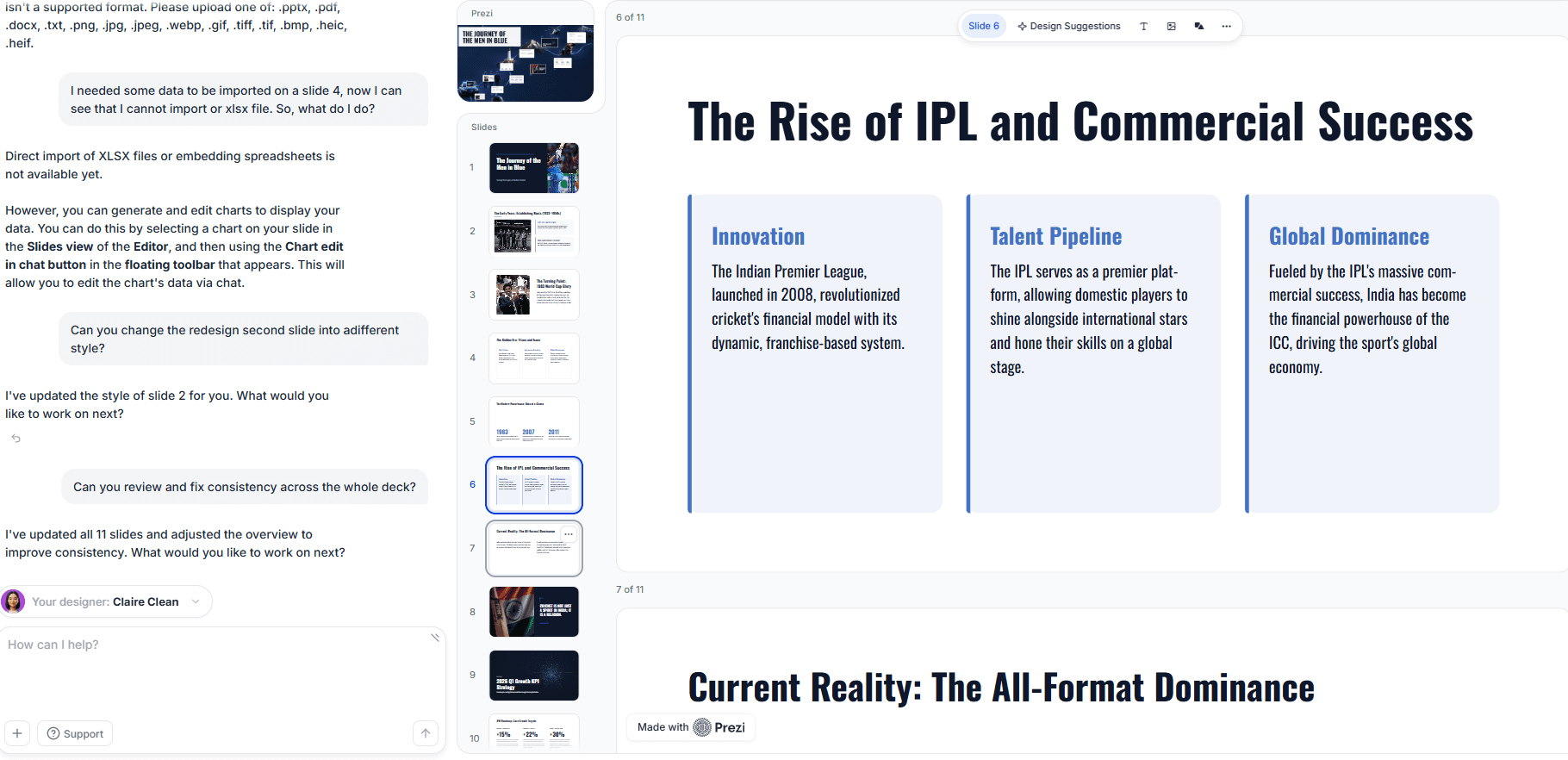
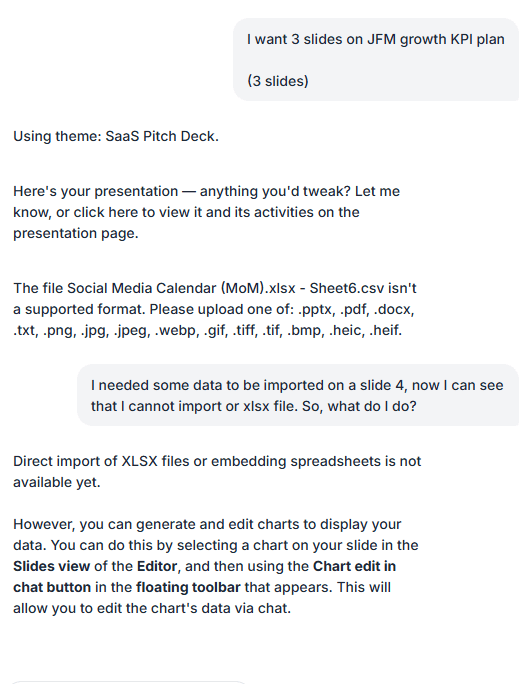
Prezi’s chat shows a three-slide KPI request followed by a completed presentation and an invitation to refine it. The same conversation reports that the CSV upload is unsupported and suggests chart editing instead. This illustrates a straightforward creation loop and a potential extra step for spreadsheet-led work; no elapsed time is shown.
Slidely AI
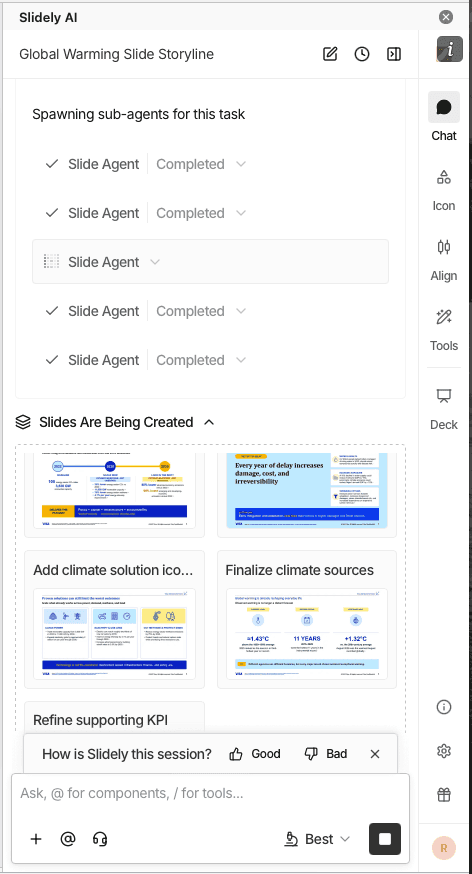
Slidely AI offers parallel chats, allowing separate presentation tasks to continue in different conversations.
Slide-completion and presentation-completion notifications help you follow progress without continuously watching a generation task. Parallel chats keep separate pieces of presentation work organized.
Our take
Our pick for managing parallel presentation tasks: Slidely AI.
Slidely’s parallel chats and notifications are useful when several presentation tasks are in progress. Prezi offers conversational generation and refinement within a presentation. We favor Slidely for parallel work, but the examples do not measure which tool reaches an approved result faster.
Branding, templates & design
Once the content is right, the next question is whether the output actually looks like it belongs to the company creating it.
For professional teams, branding is not just a logo, two colors, and a font. It is encoded in PowerPoint masters, layouts, reusable slide patterns, components, and hundreds of smaller design choices accumulated over time.
7. Can it use your real company template?
Many teams already have a professionally designed PowerPoint template. They do not need the AI to create a new design system; they need it to work correctly inside the one they already use.
We therefore looked at how easily each product can adopt an existing company or client template.
Prezi
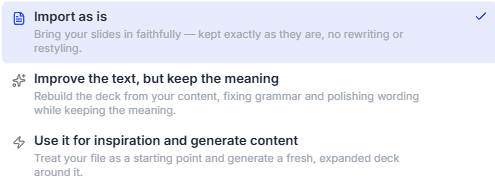
Prezi’s import screen offers three routes: preserve the slides as supplied, improve the wording while keeping the meaning, or use the file as inspiration for fresh content. These choices give users control over how much changes on import. An import-preservation option is useful, but is not proof that PowerPoint masters remain native and reusable after a round trip.
Slidely AI
Slidely AI uses an uploaded .pptx as a design source, including its layouts and visual styling.
Start from representative company slides so Slidely has the layouts and styling your team wants to reuse. Review title slides, charts and tables against that source before the final handoff.
Our take
Best fit for a PowerPoint template as the starting point: Slidely AI.
Slidely keeps your existing PowerPoint design source at the center of the work. That makes it our recommendation for teams adapting company and client decks repeatedly.
8. Can it learn and reuse your company's design patterns and preferences?
A formal template only captures part of how a company actually designs slides. Teams also reuse KPI cards, table styles, timelines, process diagrams, chart treatments, section patterns, and dozens of other components that may never appear as formal PowerPoint layouts.
At the same time, individual users develop their own preferences about which patterns they like to use.
Prezi
Prezi Teams supports brand kits for shared logos, fonts and colors. The designer picker also advertises a custom designer for qualifying Teams plans. These are meaningful ways to reuse a visual identity; the supplied evidence does not establish automatic extraction of recurring PowerPoint components or learning of user preferences.
Slidely AI
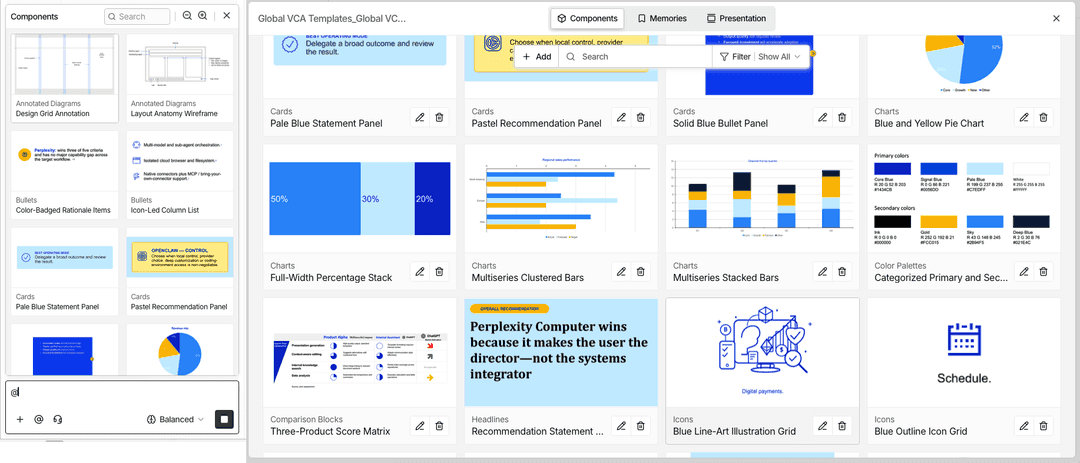
Slidely’s design components and scoped design memories are intended to reuse visual patterns and preferences from existing work.
For example, a recurring exhibit style may matter even when it is not a formal master layout. Review saved preferences so an exception for one client does not become a rule for another.
Our take
Prezi for shared brand styling; Slidely for PowerPoint design context.
Prezi gives teams reusable brand styling and distinct designer choices. Slidely’s components and design memories are particularly relevant to recurring PowerPoint exhibits and client-specific preferences. We lean toward Slidely when the existing deck’s design patterns matter more than selecting a presentation style.
9. Can it help when you do not already have a usable template?
Sometimes there is no editable company template to begin with. A team might be pitching a prospect and only have the prospect's website, a PDF report, or a few public presentations as visual references.
In that case, the problem changes from "use this template" to "help me create a usable design system from the references I have."
Prezi
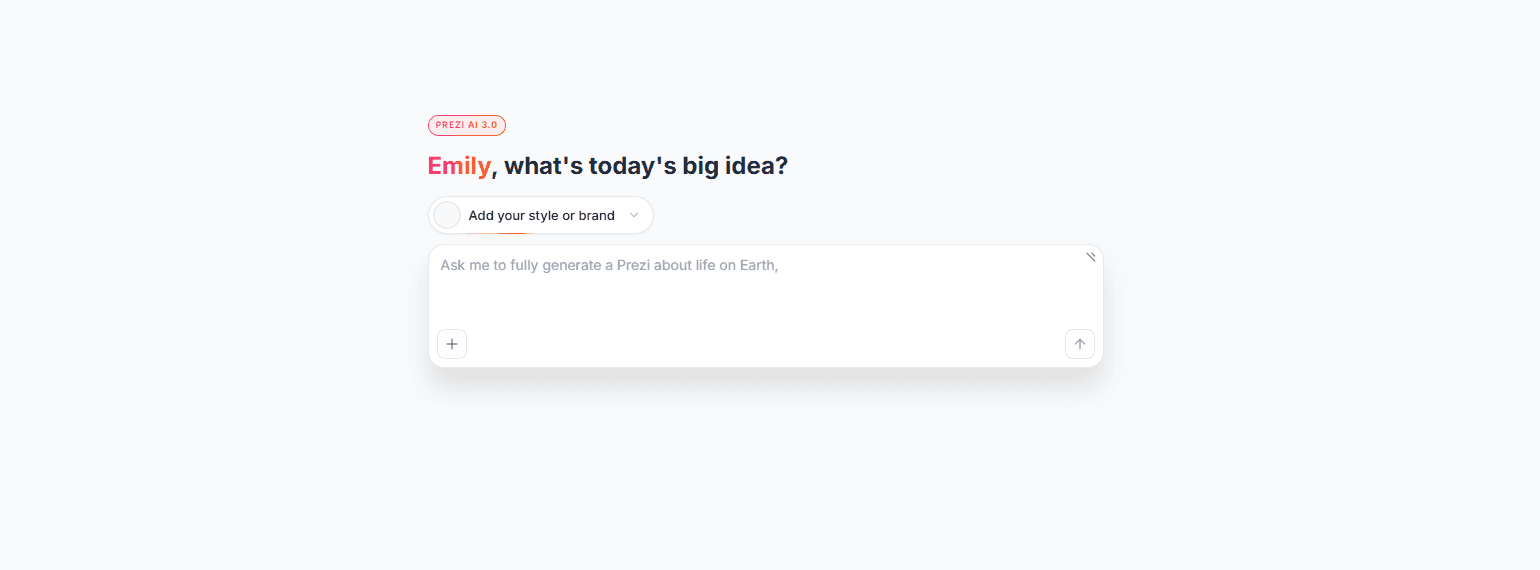
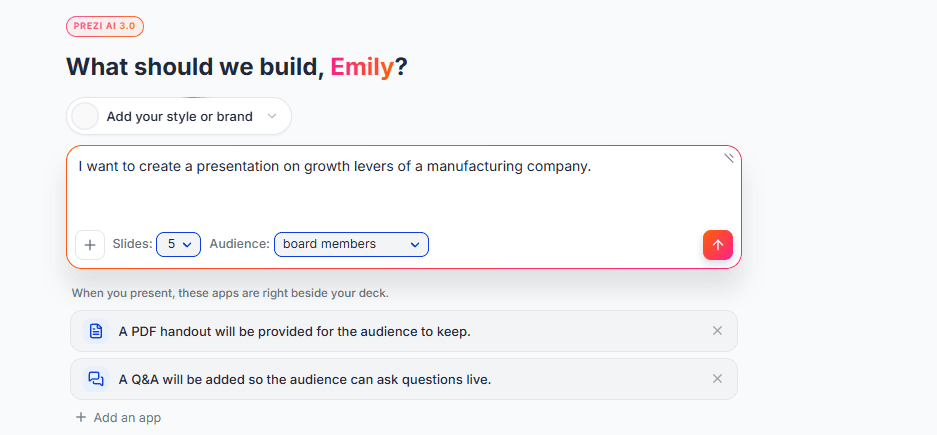
Prezi’s creation screen combines a prompt with slide count, audience and an optional style or brand. In the supplied example, the brief asks for growth levers for a manufacturing company and targets board members. Prezi’s designer choices provide starting points without requiring a company deck.
The screen also offers a PDF handout and live Q&A alongside the presentation. Those options make Prezi worth considering when the job includes audience engagement as well as creating the visual content.
Slidely AI
Slidely AI also offers design starting points and tools for creating PowerPoint masters and layouts.
When working from a PDF or screenshot, separate visual inspiration from exact reconstruction. Review fonts, spacing and editable objects before treating the result as an approved company template.
Our take
Tie: Prezi for a visual starting point; Slidely for a reusable PowerPoint system.
Prezi is an appealing choice when there is no template and the team wants designer guidance or an engaging presentation format. Choose Slidely when the goal is to develop editable PowerPoint masters and layouts for recurring business work.