ChatGPT vs Slidely AI

A broad AI workspace or a dedicated PowerPoint copilot?

Compare how ChatGPT and Slidely AI handle presentation creation, company templates, existing-deck edits and ongoing PowerPoint work.

Updated

See the comparison ↓

ChatGPT

Research, analysis and deck creation

Slidely AI

Business PowerPoint workflows

Illustrative workflow previews

Our take

Slidely AI for recurring PowerPoint work; ChatGPT for broader research, analysis and slides.

Contents

For teams whose recurring work centers on business PowerPoint decks, Slidely AI is our pick. ChatGPT is a capable alternative when research, analysis, and presentation creation belong in the same workspace. The supplied examples include ChatGPT Work and a ChatGPT PowerPoint side panel, with substantial editing and template reuse in both workflows. This comparison covers 20 practical questions. The illustrated workflows and supporting documentation were reviewed on 25 September 2026; this comparison was updated on 28 September 2026.

ChatGPT vs Slidely AI at a glance

ChatGPTChatGPTSlidely AISlidely AI
Best forResearch, analysis and deck work in one environmentOur pick for ongoing business PowerPoint work
Where you workWork interfaces and PowerPoint editing where availableWeb plus PowerPoint add-in on Windows and Mac
Starting from source materialUploaded files, stored references and connected sourcesBring reference files and your PPT design source together
Storyline and researchConversational planning, research and source notesClarify the brief and review content and sources before design
Company templatesReference decks and reusable templates demonstratedBuild around your company PowerPoint layouts and styling
AI editingFile revisions and PowerPoint side-panel editsRevise existing PowerPoint content through conversation
PowerPoint outputEditable PPTX content; inspect individual objectsContinue working with native editable PowerPoint content
EnterprisePlan-dependent workspace and identity controlsEvaluate VPC deployment and organizational LLM options
Google SlidesNative work through the Google Drive connectionBuilt for PowerPoint; no native Google Slides add-in advertised
Free planFree access with plan, tool and usage limitsStart with a limited ongoing free plan; add-in trial applies

How we compared ChatGPT and Slidely AI

We reviewed the supplied ChatGPT screenshots against the Slidely workflows below. The examples span different models, tasks and interfaces, so a capability shown in one session should not be assumed available in every plan or workspace. This is a Slidely-authored comparison that gives particular weight to recurring PowerPoint work. Screenshots support observations about these examples; they are not a controlled quality or speed benchmark. Official OpenAI documentation supplements platform, pricing and administration details.

Presentation creation

1. How easy is it to give the AI your source material?

2. Can the tool research and enrich the presentation?

3. How well does it plan the storyline and slide content?

4. Can you control the design direction before generation?

5. Can it create high-quality, data-dense slides?

6. How fast and flexible is the creation workflow?

Branding, templates & design

7. Can it use your real company template?

8. Can it learn and reuse your company's design patterns and preferences?

9. Can it help when you do not already have a usable template?

Editing, data & PowerPoint productivity

10. How well can it edit existing slides with AI?

11. How well can it redesign one or multiple slides?

12. Can it re-template slides into a new design system?

13. Can it review and fix consistency across the whole deck?

14. Can it find and improve visual assets?

15. Does it keep everything natively editable in PowerPoint?

16. Does it provide advanced PowerPoint productivity tools?

Platform, user experience & enterprise

17. Where can you use the product?

18. How accessible are pricing and human support?

19. How well does it support enterprise deployment, model control, and security?

20. Can it work with ChatGPT, Claude, and other AI assistants?

Presentation creation

The first part of our comparison looks at everything that happens before a finished deck exists: giving the AI context, researching the topic, developing the storyline, aligning on the design direction, and finally turning all of that into slides.

1. How easy is it to give the AI your source material?

A useful input workflow should distinguish the evidence for a presentation from its visual template. A report supplies facts; a company deck supplies design rules. The key question is how clearly the tool lets you provide both.

ChatGPT

The screenshot shows an existing presentation attached to a ChatGPT project. The menus elsewhere in this comparison also offer file uploads, Library access and connected Google Drive sources. This gives users several routes for bringing context into the task. The CSV-based presentation in section 16 further shows that the workflow can use structured data, rather than only a written prompt.
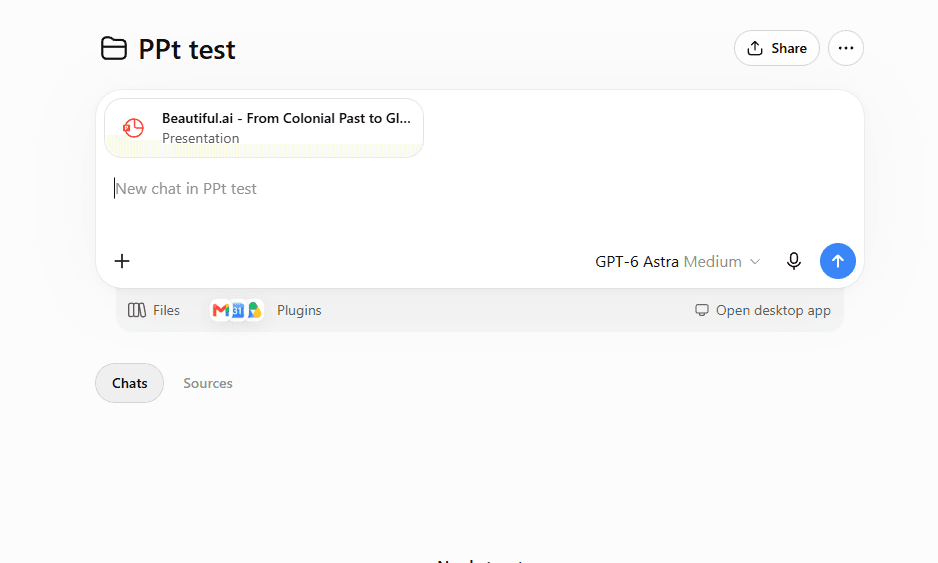
ChatGPT file upload and reference-material controls

Slidely AI

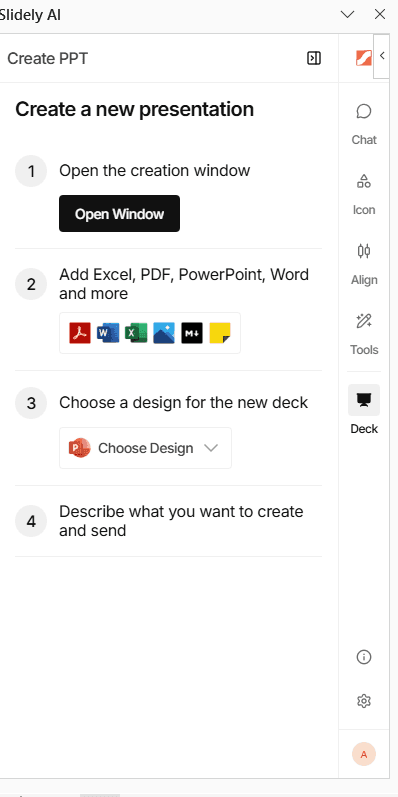
Slidely AI accepts documents, slides, and spreadsheets as references, along with an uploaded PowerPoint design source. That lets a team provide its brief, supporting data and branded deck together, then review how those inputs are used during planning.

Our take

Slidely for a PowerPoint brief and template; both support content inputs.

Both tools can work from files and presentation references. ChatGPT is useful when the deck is one output from a broader analysis. We lean toward Slidely when the central task is combining references with a company PowerPoint design source and moving through a dedicated presentation workflow.

2. Can the tool research and enrich the presentation?

The files a user provides rarely contain all the context needed for a strong presentation. External information can completely change the interpretation of the internal data. A company growing at 20%, for example, looks very different if its market is growing at 10% versus 40%.

Research is useful only when the reader can verify it. We compare where external information enters the workflow and how easily a reviewer can check the supporting sources.

ChatGPT

The first example shows ChatGPT reviewing an existing cricket deck, identifying narrative gaps and revising its structure. The visible slide includes a source URL in its speaker notes for the IPL launch date. This is evidence of source-backed enrichment within the example, rather than only rewriting the supplied text.
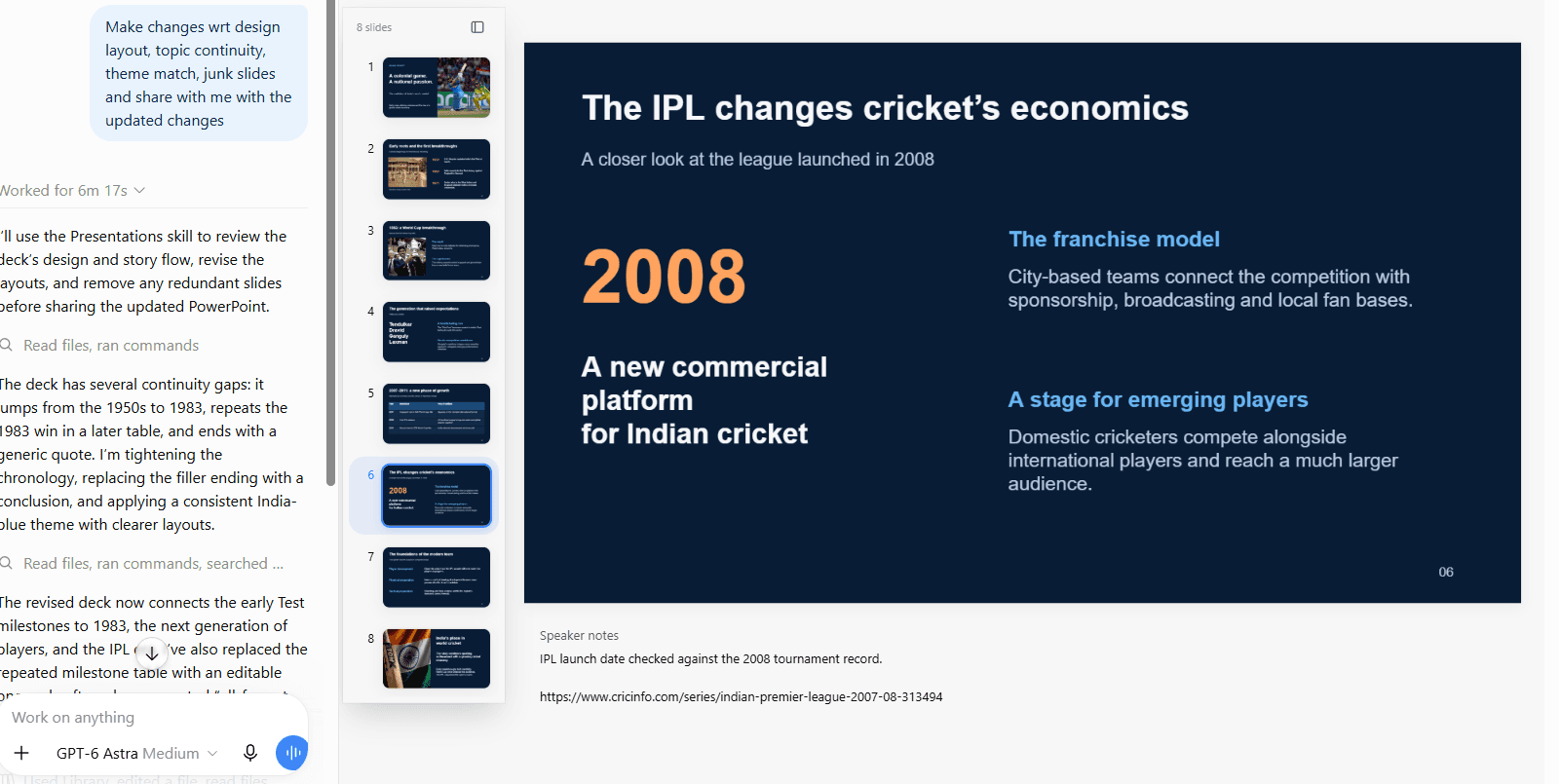
ChatGPT revising a deck with a source reference in speaker notes
ChatGPT presentation review example

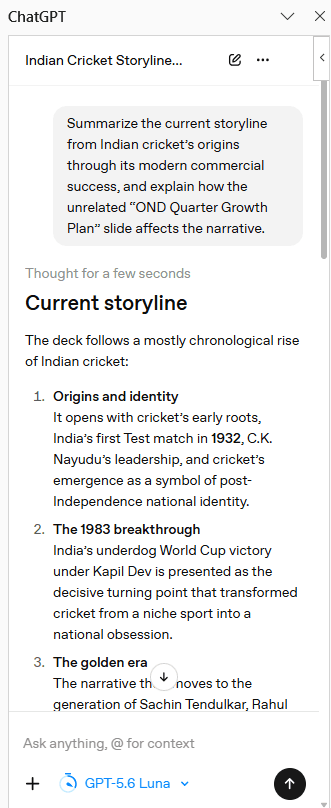
The PowerPoint side-panel example summarizes the deck’s storyline and identifies the role of unrelated growth-plan content. That demonstrates narrative analysis. It should be distinguished from a complete research audit: readers still need to verify each material claim and its source.

Slidely AI

Slidely AI includes web search in its creation workflow and provides source links for review. Users can examine slide content and citations before proceeding with generation.

Slidely lets you review the evidence alongside the planned slide content before committing to the design. Check the source date, geography and definition of each metric at that stage, when correcting the argument is easiest.
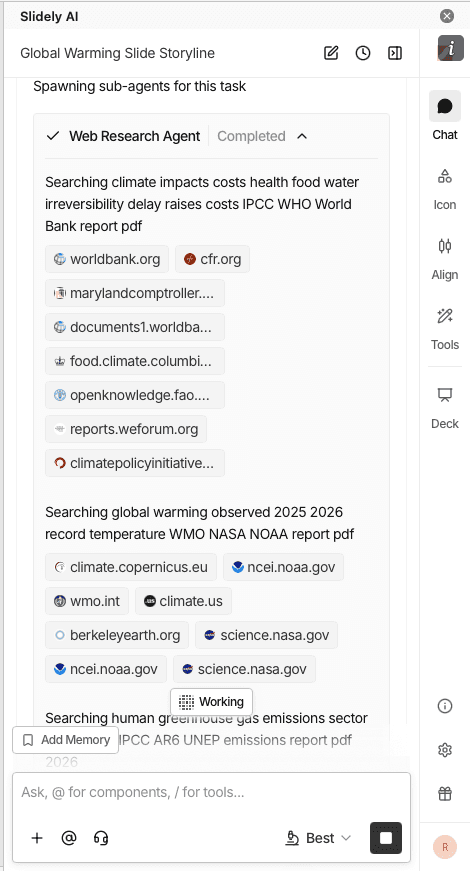
Slidely AI web-research workflow

Our take

ChatGPT for broader research; Slidely for slide-by-slide planning review.

ChatGPT is a credible choice when research and analysis extend beyond the presentation itself. Slidely is our preference when reviewers want evidence and planned slide content organized within the presentation-creation process. The screenshots do not establish that either product researches more accurately.

3. How well does it plan the storyline and slide content?

A good presentation is not simply a document broken into slides. Before designing anything, the creator needs to decide who the presentation is for, what the audience should take away, how the argument should unfold, and what evidence belongs on each slide.

The comparison here is about opportunities to review the argument before generation, rather than whether either product can produce an outline.

ChatGPT

ChatGPT can examine the existing argument, identify continuity gaps and propose a revised flow, as the screenshots in section 2 show. A user can also settle the audience, key message and outline in conversation before requesting slides. The supplied material demonstrates story analysis after an initial deck exists; it does not establish a fixed planning sequence for every ChatGPT presentation task.

Slidely AI

Slidely AI asks clarifying questions about the brief and supports review of the storyline and planned content for individual slides.

Use that stage to settle the audience, recommendation and supporting evidence. It is easier to correct a missing argument before investing in slide design.
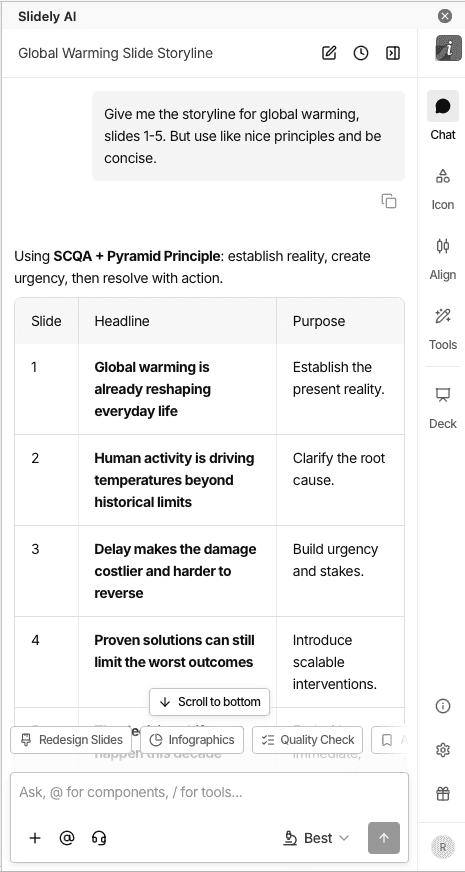
Slidely AI clarification questions and framework planning

Our take

Both support planning; Slidely for a detailed PowerPoint brief.

Both can help develop a storyline. ChatGPT offers flexible discussion and analysis, while Slidely’s clarification and slide content review provide a dedicated path for presentation planning. We lean toward Slidely for teams that want that path repeated across business decks, rather than treating planning as an exclusive capability.

4. Can you control the design direction before generation?

Even if the storyline and data are correct, there are many ways to visualize the same presentation. Discovering that the AI chose the wrong design direction after generating 30 or 50 slides creates unnecessary rework.

We therefore looked at how much control users have over layouts and visual direction before the full deck gets generated.

ChatGPT

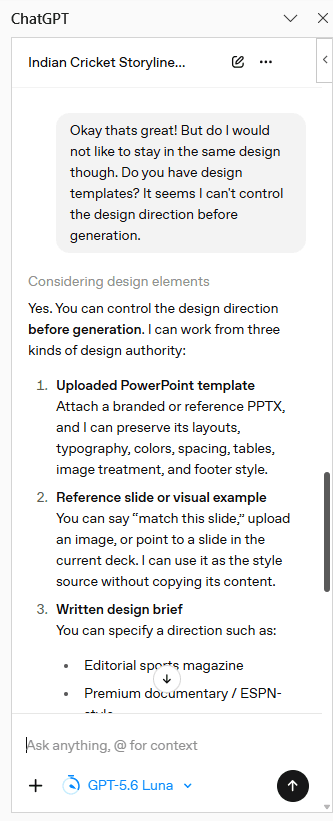
The screenshots explicitly offer three ways to set direction: upload a PowerPoint template, provide a reference slide or image, or describe a visual style. In the Work example, ChatGPT acknowledges the choice of a blue theme, agrees on the direction, and proposes two sample slides for approval. The template browser was unavailable in that particular session; this is a session-specific limitation.
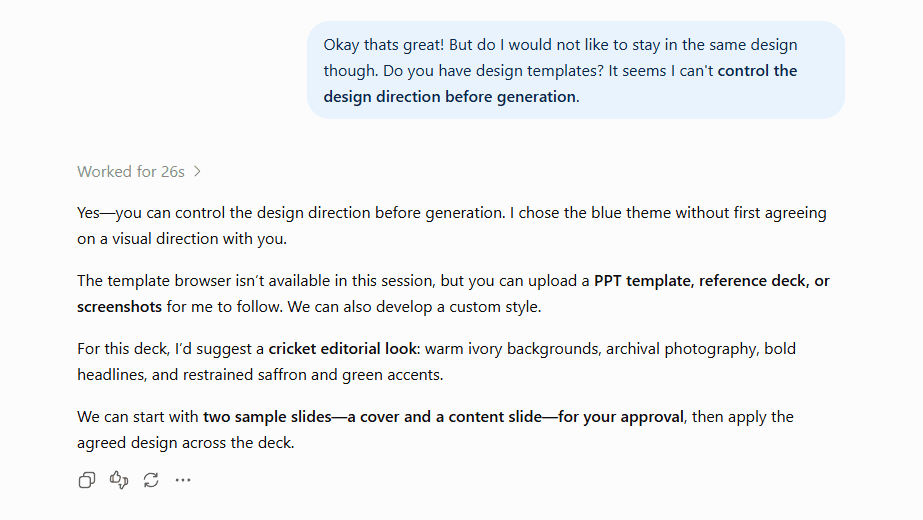
ChatGPT design direction in Work
ChatGPT design guidance in PowerPoint

Slidely AI

Slidely AI can use layouts from an uploaded PowerPoint template and lets users review layout choices alongside slide content.

This is useful when a team already knows which company layouts are appropriate for evidence, recommendations, and detailed exhibits.
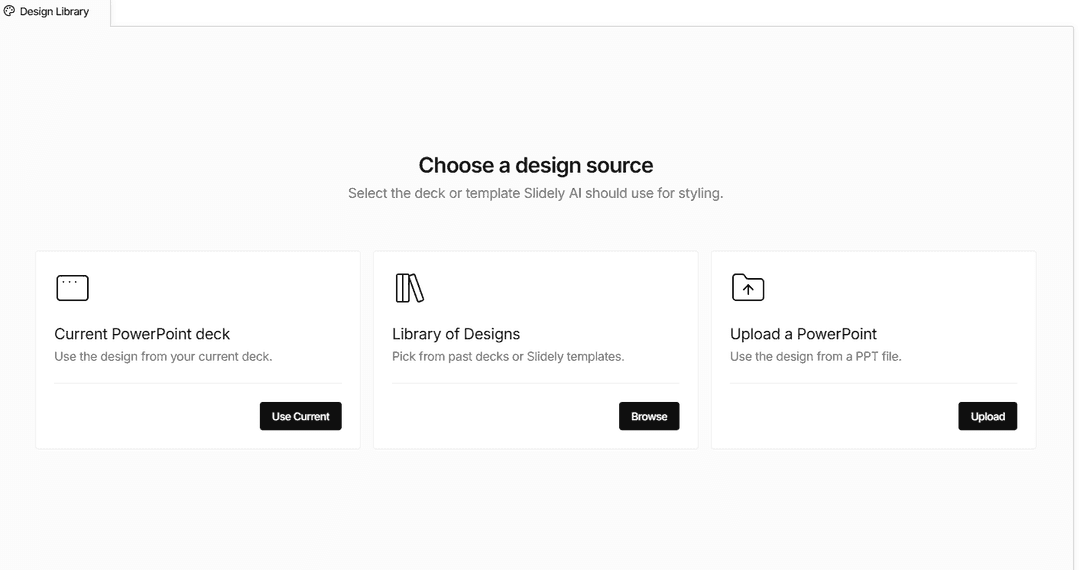
Slidely AI PowerPoint layout and design-source controls

Our take

Both accept design direction; Slidely for dedicated layout selection.

ChatGPT gives users meaningful control through references and a written brief. Slidely is our pick when teams want to review company PowerPoint layouts alongside the planned content. Agreeing on a sample before full generation is useful in either workflow.

5. Can it create high-quality, data-dense slides?

Professional presentations vary enormously in information density. An executive summary might contain one message and a chart; a consulting or financial-analysis slide might contain several charts, a detailed table, annotations, and supporting evidence.

We wanted to see whether the design adapts to the information, or whether the information has to be simplified to fit the design.

ChatGPT

The supplied ChatGPT slide combines a headline, a four-player cricket statistics table, a takeaway and source notes. It demonstrates a data-rich exhibit rather than just a text outline. The displayed run totals reconcile to the headline of 45,202. That checks one visible calculation, not the accuracy of every statistic or the editability of the underlying objects.
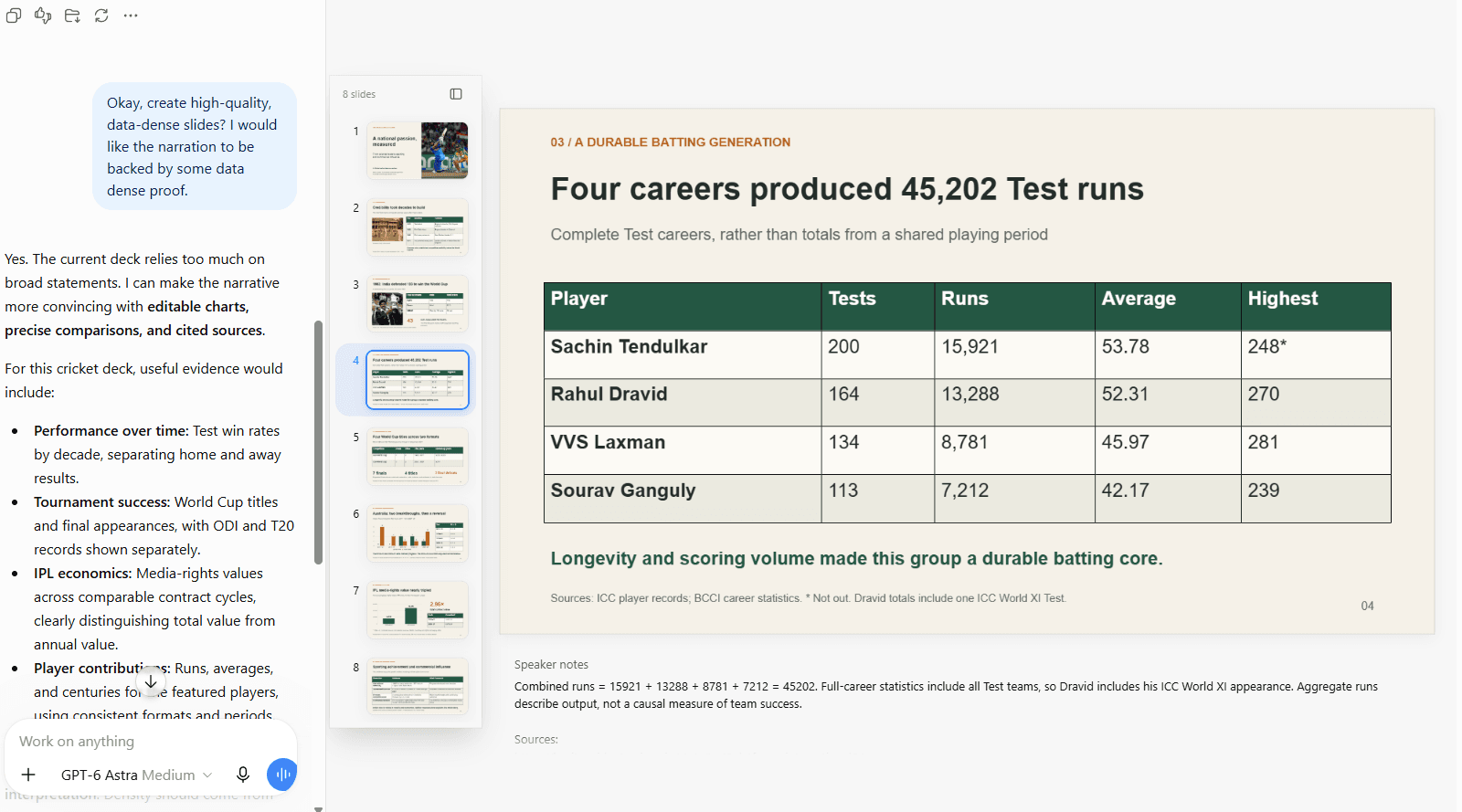
ChatGPT output combining a statistics table, takeaway and source notes

Slidely AI

Slidely AI generates editable PowerPoint charts, tables, and shapes. The example below shows a dense exhibit with several layers of information on a single slide.

Editable charts, tables and shapes let your team keep refining the exhibit in PowerPoint. Review the values and source references as part of the normal approval process.
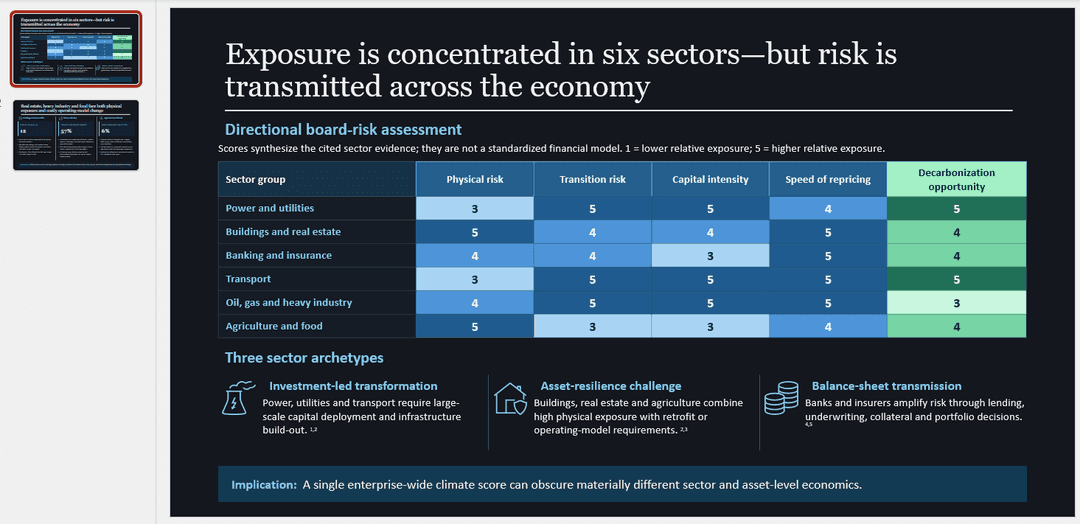
Slidely AI output for a data-heavy prompt

Our take

Our pick for dense, editable PowerPoint exhibits: Slidely AI.

ChatGPT can produce analytical slides, and this example should receive credit for that. Slidely remains our preferred workflow for dense PowerPoint exhibits that need repeated revision. The two screenshots use different tasks, so they do not establish a universal output-quality ranking.

6. How fast and flexible is the creation workflow?

Generating a long presentation still takes time with any AI system. What matters is not only the absolute generation time, but whether the product keeps the user blocked while work is happening.

A useful comparison measures time to an approved deck, including review and repairs. Generation time alone is not enough.

ChatGPT

The PowerPoint side panel shows an active task at 33 minutes 35 seconds, with two of four stages complete and several layout-repair steps listed. This particular run required iteration. It is not a completed timing test and should not be generalized to all ChatGPT decks or compared directly with a different Slidely task.
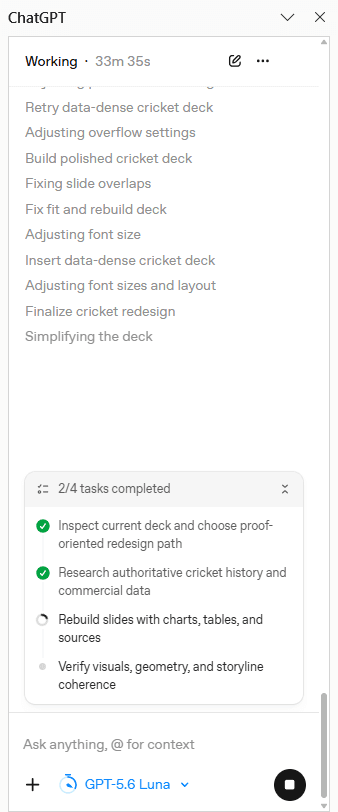
ChatGPT PowerPoint side panel showing task progress

Slidely AI

Slidely AI offers parallel chats, allowing separate presentation tasks to continue in different conversations.

Slide-completion and presentation-completion notifications help you follow progress without continuously watching a generation task. Parallel chats keep separate pieces of presentation work organized.
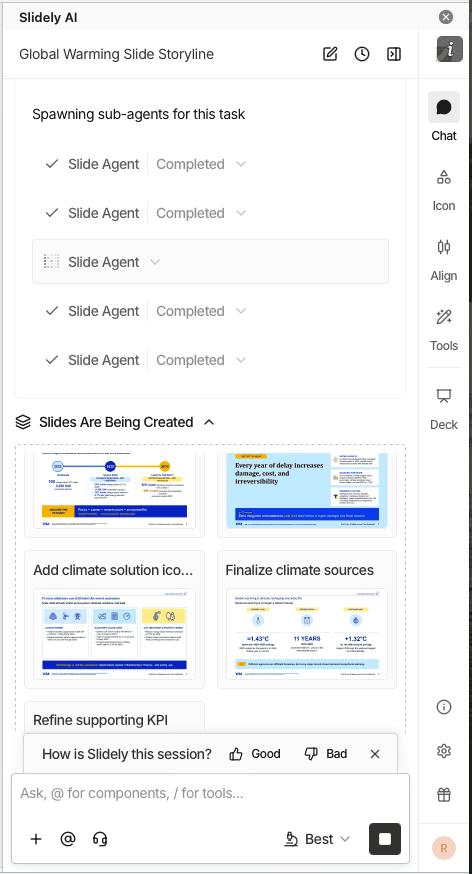
Slidely AI parallel chats and slide creation

Our take

Our pick for managing parallel presentation tasks: Slidely AI.

Slidely’s parallel presentation chats and completion notifications suit teams juggling several decks. ChatGPT’s example exposes progress and repair activity, which helps a user see what is happening. We prefer Slidely’s presentation-focused task management, while making no measured claim that it is consistently faster.

Branding, templates & design

Once the content is right, the next question is whether the output actually looks like it belongs to the company creating it.

For professional teams, branding is not just a logo, two colors, and a font. It is encoded in PowerPoint masters, layouts, reusable slide patterns, components, and hundreds of smaller design choices accumulated over time.

7. Can it use your real company template?

Many teams already have a professionally designed PowerPoint template. They do not need the AI to create a new design system; they need it to work correctly inside the one they already use.

We therefore looked at how easily each product can adopt an existing company or client template.

ChatGPT

ChatGPT offers file uploads and access to stored references, as the menu below shows. The stronger evidence is the example in section 8: a supplied AI Economics PowerPoint is used to create a five-slide growth plan in a similar design. This supports using a real company deck as a reference, although exact master and layout preservation requires inspecting the resulting file.
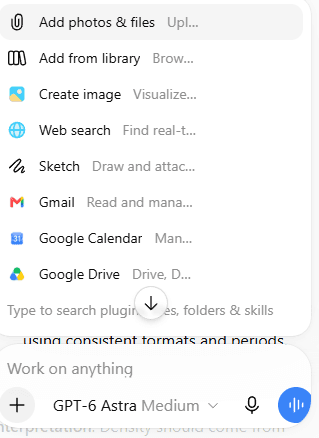
ChatGPT file, Library and connected-source options

Slidely AI

Slidely AI uses an uploaded .pptx as a design source, including its layouts and visual styling.

Start from representative company slides so Slidely has the layouts and styling your team wants to reuse. Review title slides, charts and tables against that source before the final handoff.

Our take

Best fit for a PowerPoint template as the starting point: Slidely AI.

Slidely keeps your existing PowerPoint design source at the center of the work. That makes it our recommendation for teams adapting company and client decks repeatedly.

8. Can it learn and reuse your company's design patterns and preferences?

A formal template only captures part of how a company actually designs slides. Teams also reuse KPI cards, table styles, timelines, process diagrams, chart treatments, section patterns, and dozens of other components that may never appear as formal PowerPoint layouts.

At the same time, individual users develop their own preferences about which patterns they like to use.

ChatGPT

The example shows a reusable Hello Company Presentations template and an uploaded AI Economics deck. ChatGPT then creates a five-slide growth plan using the reference’s visual patterns, with tables and a chart described as editable. This demonstrates explicit template reuse. It does not prove that every design preference is automatically learned or applied correctly across unrelated projects.
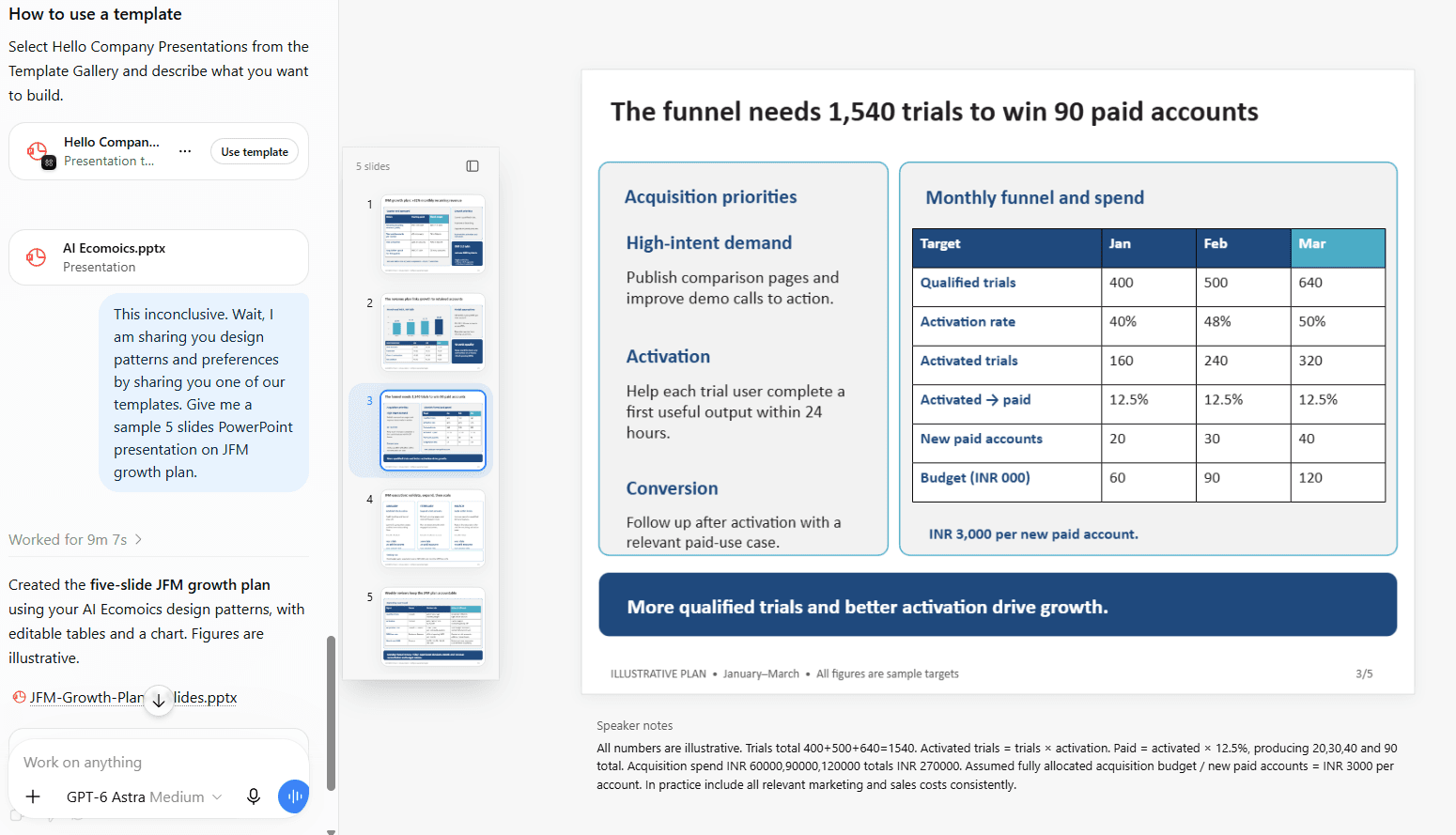
ChatGPT reusable company presentation template

Slidely AI

Slidely’s design components and scoped design memories are intended to reuse visual patterns and preferences from existing work.

For example, a recurring exhibit style may matter even when it is not a formal master layout. Review saved preferences so an exception for one client does not become a rule for another.
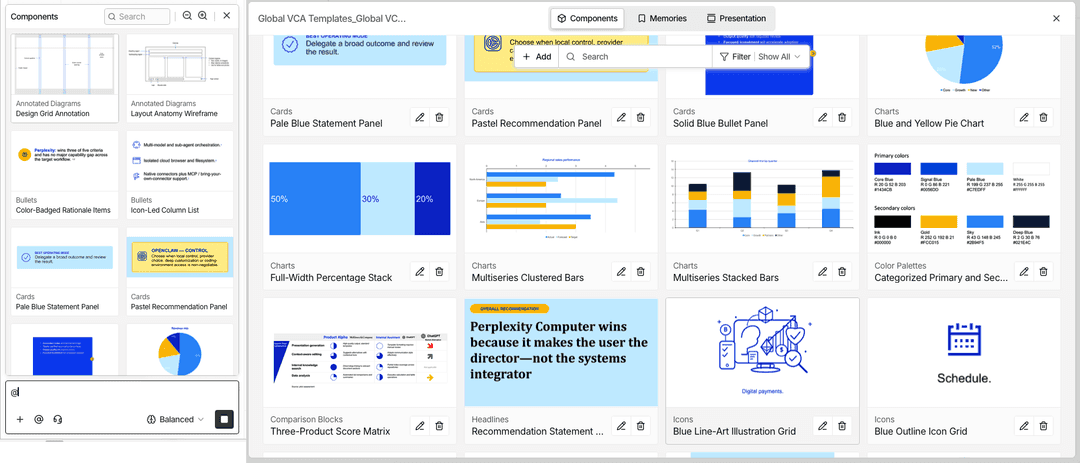
Slidely AI design component extraction

Our take

Both reuse references; Slidely for recurring PowerPoint components.

ChatGPT’s template example is a meaningful capability, especially when a team already works in that environment. Slidely’s components and scoped design memories are our preferred approach for recurring PowerPoint exhibits and client-specific patterns. The practical test is whether the next deck reuses the intended conventions without carrying over an exception.

9. Can it help when you do not already have a usable template?

Sometimes there is no editable company template to begin with. A team might be pitching a prospect and only have the prospect's website, a PDF report, or a few public presentations as visual references.

In that case, the problem changes from "use this template" to "help me create a usable design system from the references I have."

ChatGPT

ChatGPT can propose a fresh design when the content is already settled. In the example below, it returns three alternatives for a five-slide growth plan: Editorial, Midnight, and Minimal. The Editorial preview shows a new palette and composition while retaining the financial narrative. This is useful evidence of design exploration, not just theme advice.
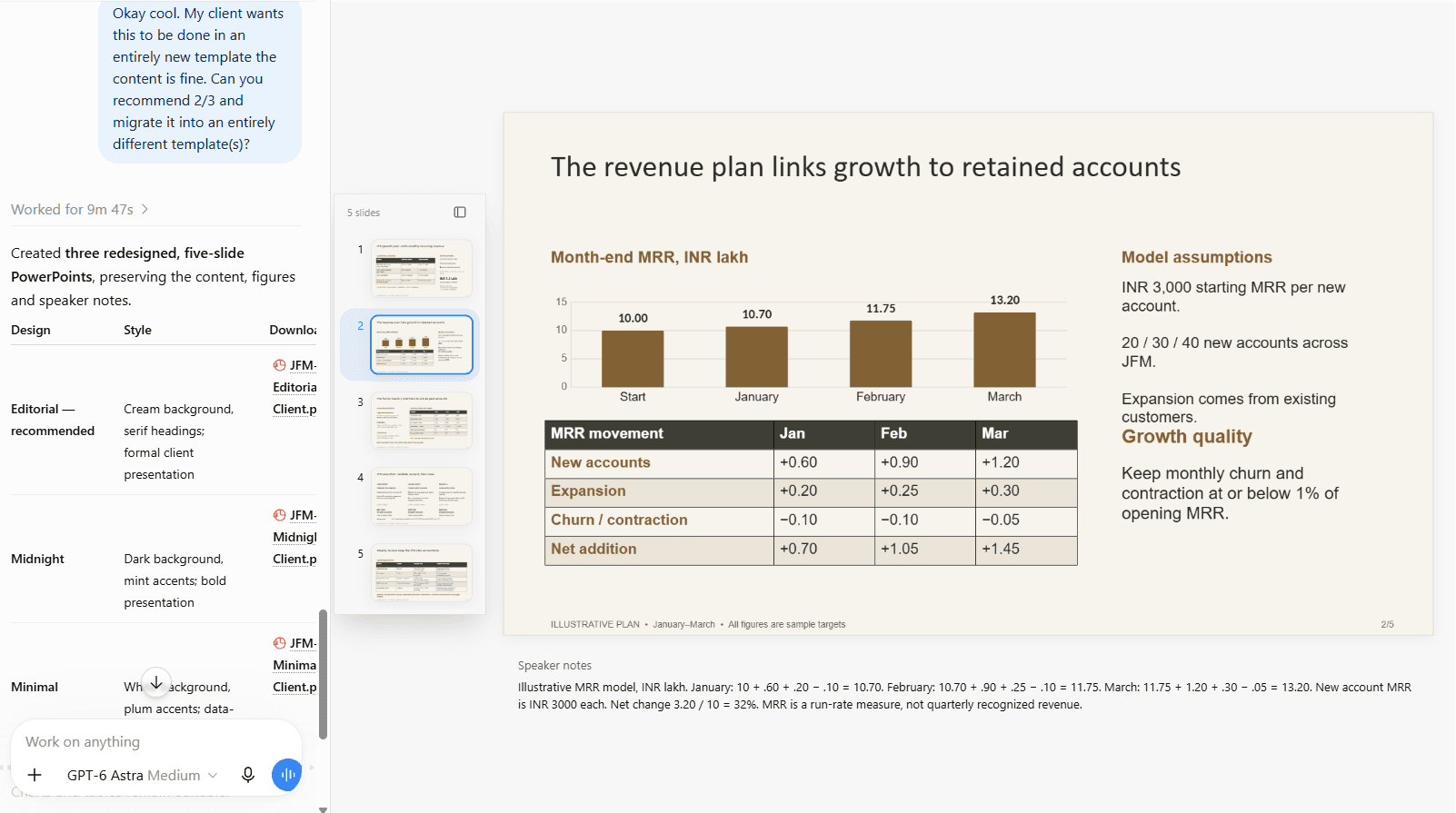
ChatGPT offering redesigned PowerPoint versions and Editorial preview

Slidely AI

Slidely AI also offers design starting points and tools for creating PowerPoint masters and layouts.

When working from a PDF or screenshot, separate visual inspiration from exact reconstruction. Review fonts, spacing and editable objects before treating the result as an approved company template.

Our take

ChatGPT for exploring alternatives; Slidely for a recurring PPT system.

ChatGPT deserves consideration when users want several new visual directions and are comfortable refining them conversationally. Slidely is our preference when the result must become part of an ongoing company PowerPoint workflow. Both require a final check of layouts, fonts and editable objects.
Make your next deck in PowerPoint

Try Slidely AI with a deck your team already uses

Bring your brief and company template together, then keep refining the slides in PowerPoint.

Editing, data & PowerPoint productivity

The first draft is only the beginning of most professional presentation workflows. Teams spend far more time reviewing slides, incorporating feedback, moving content into new templates, fixing formatting, and updating the deck as the underlying thinking changes.

The following sections compare what happens after the first draft: targeted edits, redesign, template changes and the final review.

10. How well can it edit existing slides with AI?

The most useful presentation AI should not require users to regenerate a slide whenever something changes. It should understand what is already there, modify only what the user asks for, and preserve the rest.

We also wanted the user to stay in control of significant edits rather than having the AI silently rewrite a carefully reviewed slide.

ChatGPT

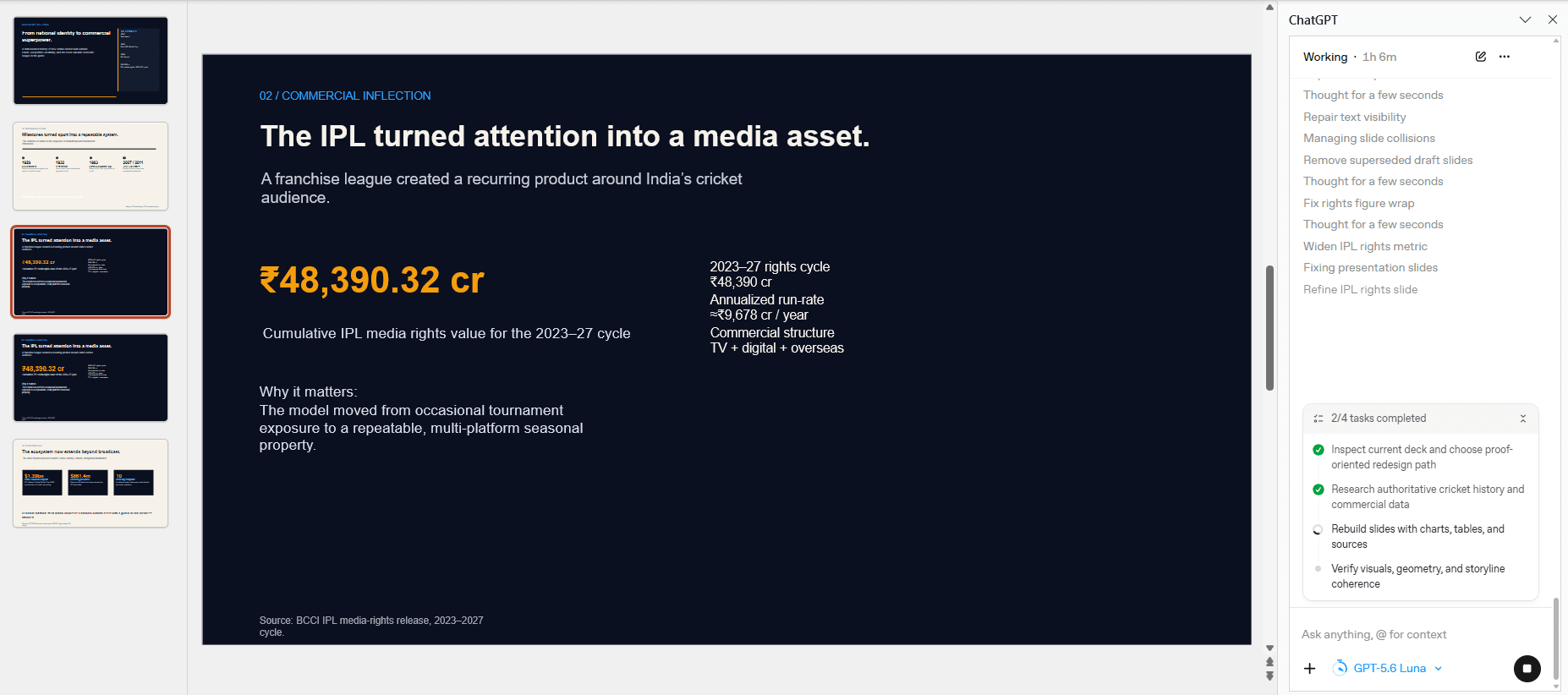
The PowerPoint side panel shows ChatGPT actively repairing an existing deck, including text visibility, collisions, duplicated drafts and metric wrapping. The visible task is still running at one hour six minutes, so the screenshot documents an iterative editing process rather than a completed success or failure. It also confirms that this comparison cannot describe ChatGPT as limited to exporting a new file from a browser.

ChatGPT PowerPoint editing in progress with layout repairs

Slidely AI

Slidely AI works on an existing .pptx through chat. Users can request text, chart or layout changes, preview the result and refine it before applying the edit.

Object-level context can make an instruction more precise. Name what should change and what must remain intact, especially for approved figures or legal wording.

Slidely AI presentation editing panel

Our take

Best fit for iterative work on existing PowerPoint files: Slidely AI.

Both products can work on an existing presentation. We lean toward Slidely for repeated business PowerPoint revisions because its workflow centers on presentation editing and review. The ChatGPT example shows capable intervention but also substantial iteration in this run; it does not establish typical repair time.

11. How well can it redesign one or multiple slides?

Often the content is already correct and the problem is visual. A user might want to improve hierarchy, make the slide more visual, simplify the layout, or bring several inconsistent slides closer to the same design language.

We wanted to see whether each product could explore alternatives without forcing the user to rewrite the underlying content.

ChatGPT

ChatGPT’s examples cover both a multi-slide redesign and targeted fixes. The three alternative growth-plan decks in section 9 show broader visual changes, while the PowerPoint panel in section 10 lists specific repairs. A request should identify the slides to change, the intended style and the content that must remain intact.

Slidely AI

Slidely AI supports conversational redesign and multi-slide editing. A request can specify the new visual direction as well as the content that must stay unchanged.

For a set of slides, check that repeated labels, colors and data treatments remain consistent after the changes.

Our take

Both support redesign; Slidely for continued PowerPoint work.

Both support conversational redesign across a deck. ChatGPT is useful for exploring alternatives, while Slidely is our preference for repeated changes within a dedicated PowerPoint process. Multi-slide editing alone is not a differentiator; the value lies in how reliably the team can review and continue the work.

12. Can it re-template slides into a new design system?

Moving slides from one template into another is common in professional work. Consultants move internal analysis into a client template, sales teams adapt corporate slides to account-specific decks, and companies periodically roll out entirely new brand systems.

A theme swap is rarely enough. The slide usually needs to be reinterpreted using the new template's layouts, typography, spacing, colors, and visual patterns.

ChatGPT

The growth-plan example in section 9 is a direct re-templating task: the user asks for an entirely new design while keeping the content. ChatGPT returns three redesigned versions and reports preserving content, figures and speaker notes. The previews support a substantive style change, but the screenshots alone cannot verify every original object or PowerPoint master.

Slidely AI

Slidely AI can generate the same content using another uploaded PowerPoint design source.

Review the new composition against the destination layouts rather than checking colors alone. Footnotes, chart labels, and dense tables are useful stress tests.

Our take

Best fit for moving content between PowerPoint design systems: Slidely AI.

ChatGPT can migrate content into a new visual design and offer multiple alternatives. Slidely remains our recommendation when the destination is a specific company or client PowerPoint design source. Check both products with the same difficult charts, tables and footnotes before judging fidelity.

13. Can it review and fix consistency across the whole deck?

A deck can contain individually good slides and still feel unfinished. Fonts vary slightly, similar charts use different colors, terminology changes from one section to another, or an object overlaps something on slide 27 that nobody noticed.

Consistency involves both prevention and inspection. A locked brand system reduces variation, while a review tool looks for problems in work that already exist.

ChatGPT

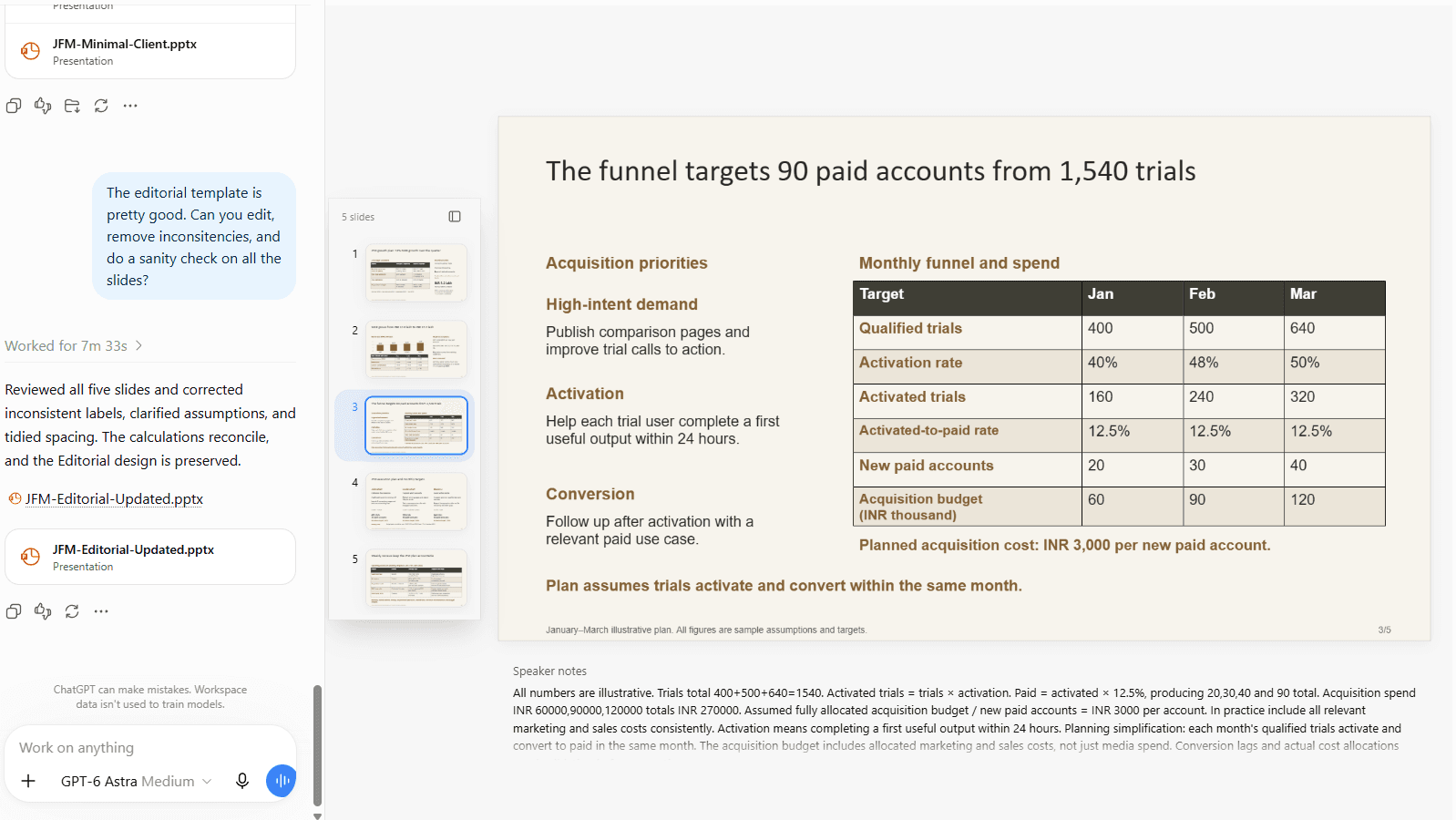
In the Editorial example, ChatGPT reports reviewing all five slides, correcting inconsistent labels, clarifying assumptions and tidying spacing. The preview includes a reconciled funnel and an explicit same-month conversion assumption. This demonstrates both editorial and visual review in the supplied workflow, although it is not an independent audit of every slide.

ChatGPT five-slide consistency review and updated PowerPoint

ChatGPT’s completed five-slide consistency review and updated PowerPoint

Slidely AI

Slidely AI includes slide review and checking tools alongside its editing workflow.

Run slide checks alongside editing, review the proposed corrections, and make the final content decisions. This puts presentation cleanup into the same workflow as the revisions themselves.

Our take

Both support consistency work; Slidely for checking PowerPoint decks.

Both support consistency review and corrections. ChatGPT’s example gives concrete changes, rather than a generic promise to check the deck. Slidely is our preference for keeping review alongside everyday PowerPoint editing. The examples do not establish which tool detects more errors.

14. Can it find and improve visual assets?

Finding the right image, icon, flag, map, or logo is a surprisingly large part of slide creation. It is also common for the first suggested visual not to be quite right.

We wanted to see whether the tools could not only add assets, but help users search, compare, replace, and iterate on them without leaving the presentation workflow.

ChatGPT

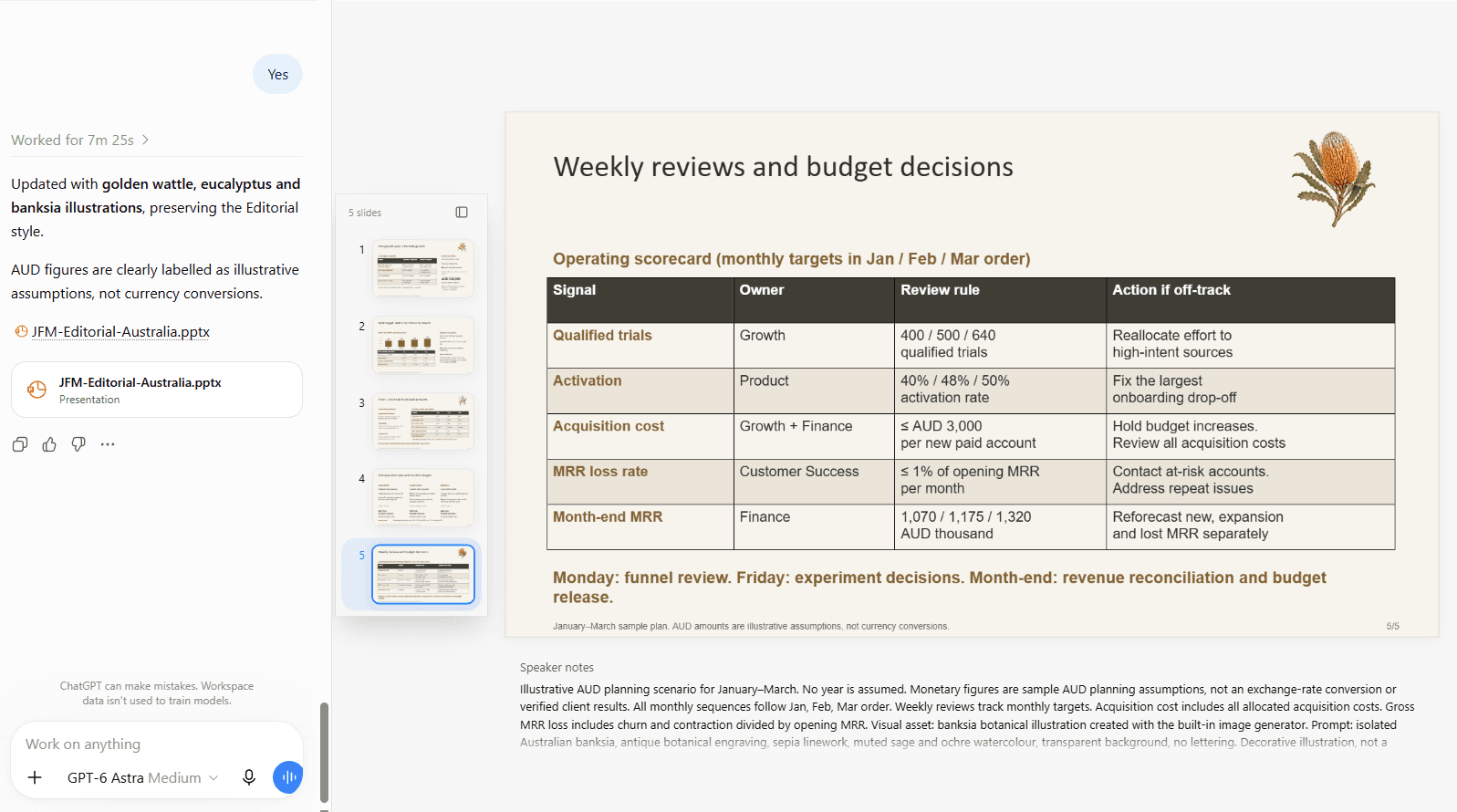
The supplied example updates an Editorial deck for an Australian audience with golden wattle, eucalyptus and banksia illustrations. ChatGPT also states that the AUD figures are illustrative planning assumptions rather than converted currency. This shows contextual asset adaptation while preserving the chosen visual style; it does not verify that every added illustration is a native editable PowerPoint shape.

ChatGPT custom visuals adapted for an Australian audience

Slidely AI

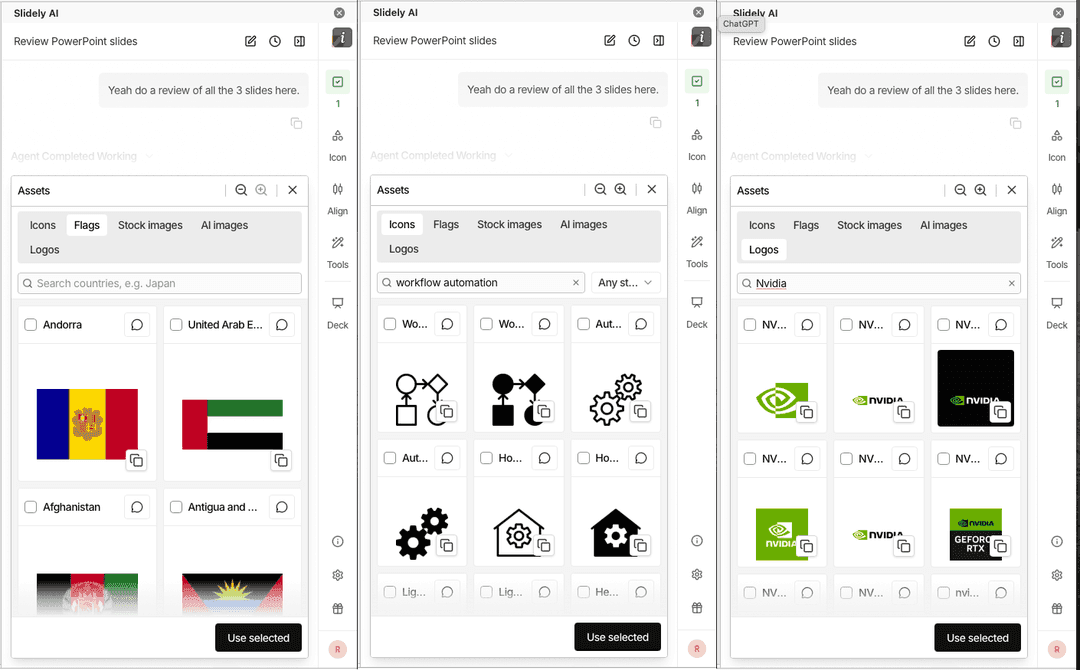
Slidely AI offers contextual asset suggestions within PowerPoint, including images, icons, logos, flags and maps.

For either tool, verify the relevance, permissions and accuracy of a visual before using it in a client presentation.

Slidely AI contextual asset suggestions

Our take

Both support visual assets; choose around your editing workflow.

ChatGPT is useful for creating and adapting visuals to a brief, as the Australian example demonstrates. Slidely brings contextual image, icon, logo, flag and map suggestions into its PowerPoint workflow. We lean toward Slidely for routine asset selection in business decks, while recognizing ChatGPT’s strength in custom visual adaptation.

15. Does it keep everything natively editable in PowerPoint?

For professional users, a slide is only useful if they can keep working with it after the AI is done. A chart needs to behave like a chart, a table like a table, and text like normal editable PowerPoint text.

Editable text is only one part of the test. Check charts, tables, notes and fonts in the actual exported file.

ChatGPT

The examples include downloadable PPTX files and report editable tables and charts. The PowerPoint side panel also shows direct work on a presentation. ChatGPT can therefore produce and revise PowerPoint content; it should not be described as image-only output. A screenshot cannot verify the object structure of every visual, so inspect the actual file for chart data, grouped shapes, text and notes.

Slidely AI

Slidely AI produces native PowerPoint content and supports continued editing of the .pptx.

It also offers image-to-slide and PDF-to-slide reconstruction. Reconstructed content needs review for transcription, grouping and numerical accuracy.

Our take

Our pick for continued work on editable PowerPoint files: Slidely AI.

16. Does it provide advanced PowerPoint productivity tools?

Not every presentation task needs an AI agent. Experienced PowerPoint users also spend hours on repetitive mechanical work: aligning objects, normalizing spacing, fixing tables, updating linked data, and applying the same formatting operation across several elements.

For frequent PowerPoint users, small repeated operations can matter as much as first-draft generation.

ChatGPT

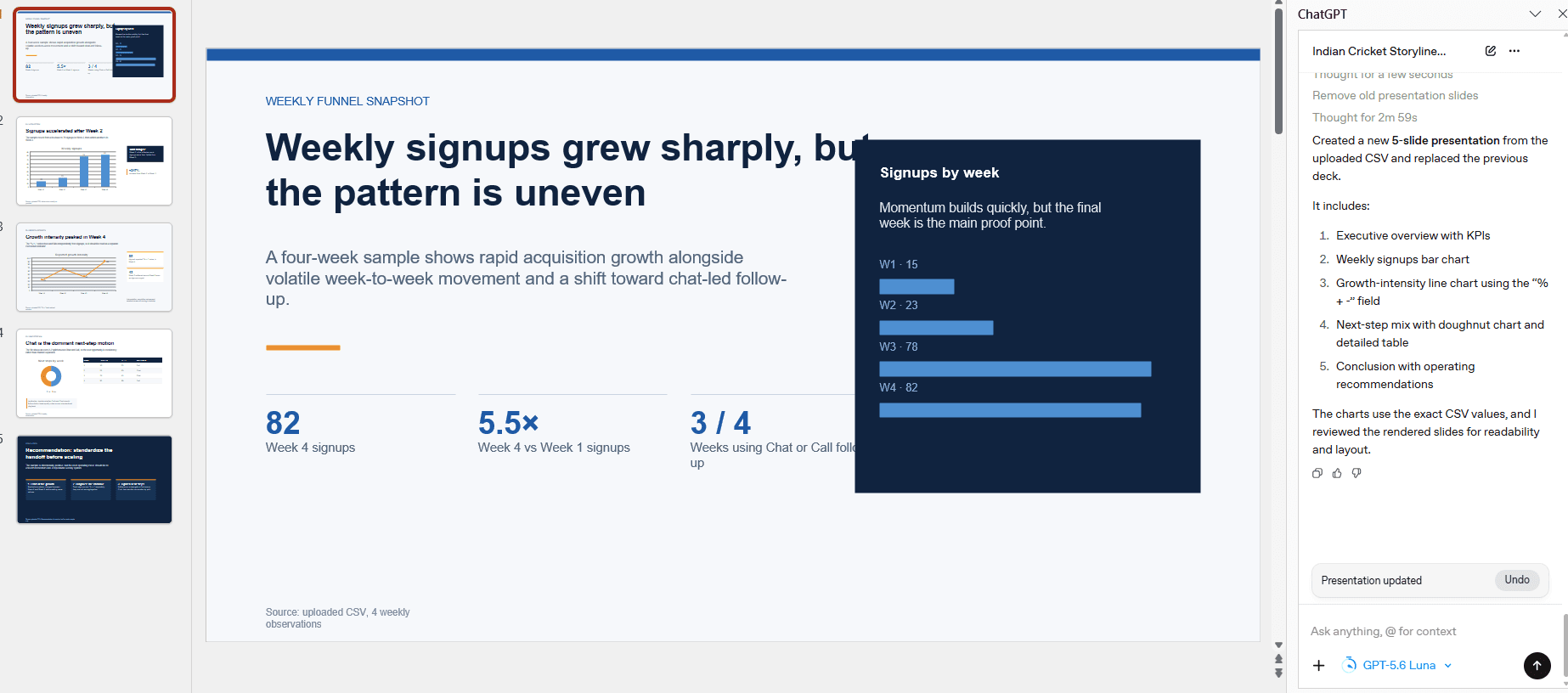
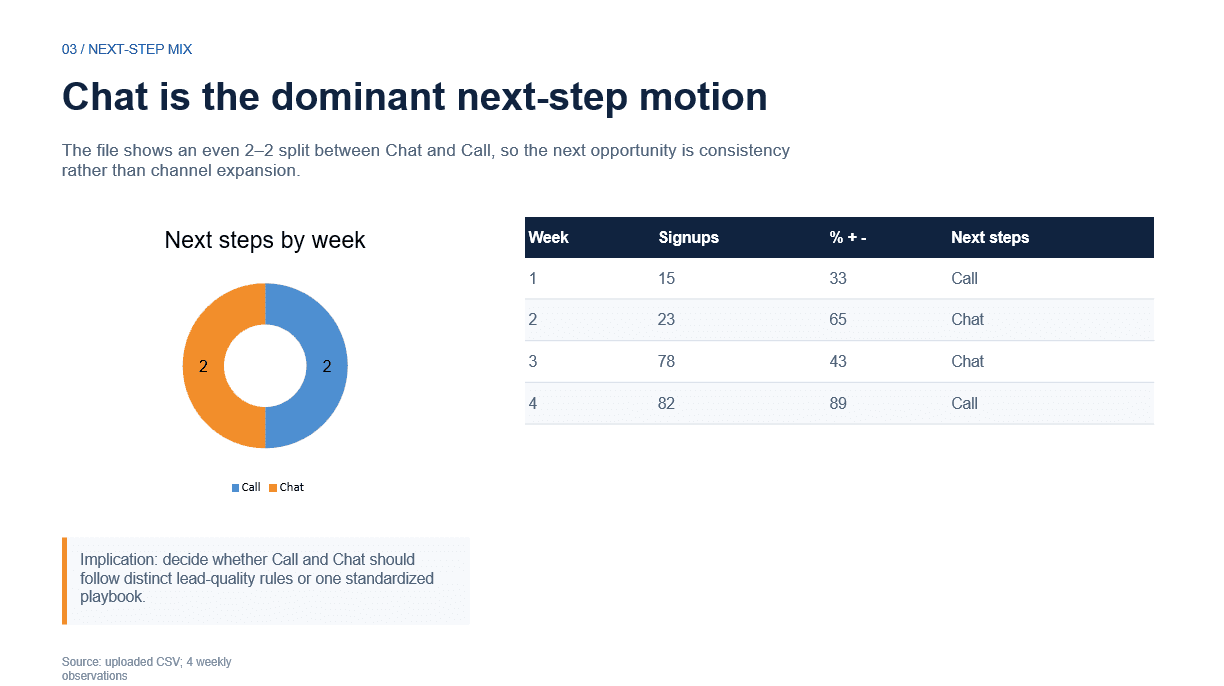
The example below shows ChatGPT turning an uploaded CSV into a five-slide presentation with charts and a table. That is useful data-to-slide automation. It does not demonstrate a dedicated toolkit for recurring alignment, Excel linking or formatting operations inside PowerPoint.

ChatGPT CSV-based presentation output
ChatGPT slide generated from CSV

The next slide also contains a review issue: its headline says Chat is dominant, while the chart, table and subtitle show an even two-to-two split between Chat and Call. The percentage column needs a defined meaning before interpretation. These are concrete reasons to review the result, not evidence that all ChatGPT output has the same problem.

Slidely AI

Slidely AI includes Auto Layout, Excel linking, slide checking and formatting tools in its add-in, with availability depending on the plan.

These utilities are relevant when the job is maintaining an existing deck rather than generating a new one. Check the features included in the subscription you intend to use.

Our take

Best fit for everyday PowerPoint utilities: Slidely AI.

Slidely combines AI work with practical PowerPoint utilities. Auto Layout, Excel linking and formatting tools address the recurring maintenance work that continues after a deck is generated.

Platform, user experience & enterprise

The final part of the comparison is less about an individual slide and more about whether the product fits the environment in which the team works.

That includes the presentation applications it supports, how easy it is to evaluate and buy, and whether larger organizations can deploy it within their security and AI infrastructure.

17. Where can you use the product?

The right platform depends heavily on where the team already builds presentations. Some organizations live entirely in PowerPoint; others rely on Google Slides; and increasingly, users also expect to start work in a browser.

ChatGPT

The supplied material shows ChatGPT Work with file previews and a ChatGPT panel inside PowerPoint. Official documentation also supports creating or updating native Google Slides through the Google Drive connection. The available tools vary by plan, workspace and interface, so specify which environment is being evaluated rather than treating all ChatGPT experiences as identical.

Slidely AI

Slidely AI is available on the web and through its PowerPoint add-in for Windows and Mac.

Its published workflow centers on PowerPoint. If native Google Slides editing is essential, assess that requirement separately rather than assuming a PowerPoint export provides the same experience.

Our take

ChatGPT for broader connected work; Slidely for presentation-focused tools.

ChatGPT is compelling when a presentation is part of a larger research, spreadsheet or document workflow. Slidely is our recommendation when the team wants its daily work organized around PowerPoint creation, editing and maintenance. Both can operate in PowerPoint; the distinction is specialization rather than browser access versus an add-in.

18. How accessible are pricing and human support?

Presentation software is difficult to evaluate from a marketing page. Users need to test it with their own slides, their own templates, and their own real-world editing tasks.

We therefore looked at both how easily someone can evaluate the product and what happens when they need actual help.

ChatGPT

ChatGPT’s published plans include free and paid access, with usage and feature availability depending on the plan and workspace. A free account should not be assumed to reproduce every model and tool shown in these screenshots. This document contains no comparable ChatGPT support interaction, so it cannot establish relative response time or service quality.

Slidely AI

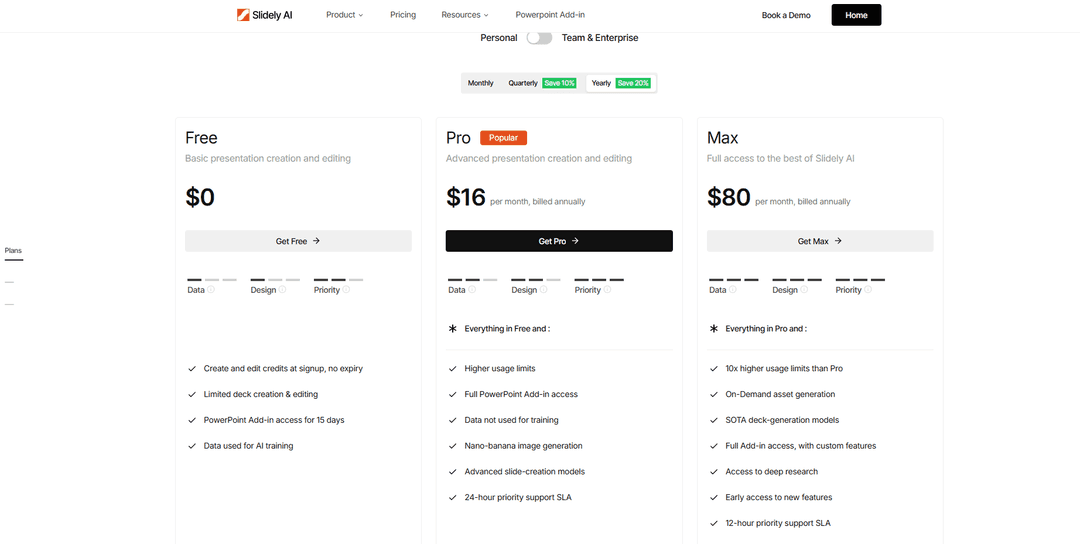
Slidely AI offers a $0 plan with limited credits supplied at signup and no credit expiry. Free access does not mean unlimited generation; PowerPoint add-in access is listed as a 15-day trial.

Its published annual-billing prices include Pro at $16 per month and Max at $80 per month. Support commitments and usage limits vary by plan. Confirm current terms before purchasing.

Slidely AI free-plan experience
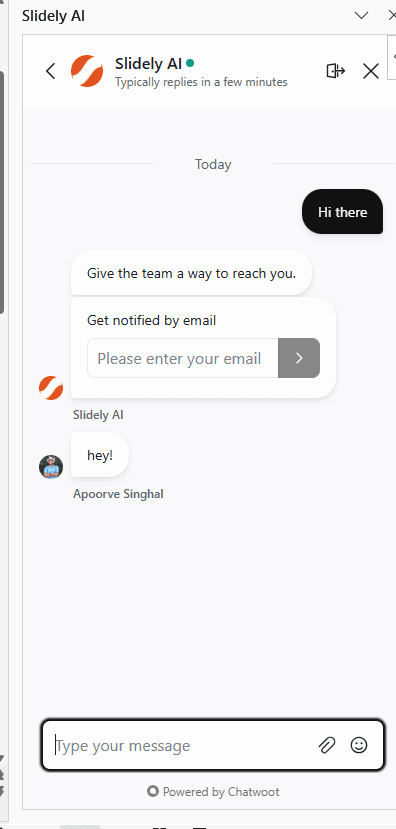
Slidely AI in-product human support

Our take

Both offer free entry points; compare the workflow available on each plan.

Both provide a way to start without buying a paid subscription, subject to limits. Evaluate the actual presentation tools and usage allowance included in the account you plan to use. Slidely is our preferred starting point for a dedicated PowerPoint workflow; the available evidence does not establish a support-quality winner.

19. How well does it support enterprise deployment, model control, and security?

For a large organization, presentation features are only one part of the procurement decision. Security teams may care just as much about where data is processed, what model infrastructure is used, whether the product can run in a private environment, and how employees are administered.

ChatGPT

ChatGPT Work has workspace controls for access, tools and connected sources. Official enterprise guidance describes plan-dependent identity controls such as SSO and SCIM, alongside governance of actions and permissions. These controls should not be conflated with running the ChatGPT product inside a customer VPC or using an arbitrary organizational LLM endpoint. The reviewed material does not establish those deployment arrangements.

Slidely AI

Slidely AI publishes SOC 2 and GDPR assurances and lists VPC deployment among its Enterprise options.

Its Enterprise documentation describes integration with organizational LLM endpoints. Validate the deployment, data flows and contract for your configuration; do not assume those arrangements apply to a self-serve account. Its pricing page distinguishes free-plan training use from paid-plan terms.

Our take

ChatGPT for broader workspace governance; assess Slidely’s deployment options.

ChatGPT deserves consideration where research, documents and presentations need common workspace governance. Slidely merits a closer look when its stated VPC or organizational LLM options match a procurement requirement. Our preference for Slidely concerns presentation workflow fit, not a blanket claim of superior security. Validate the specific plan, data flows and contract for either product.

20. Can it work with ChatGPT, Claude, and other AI assistants?

More presentation work is beginning upstream in general-purpose AI tools. A user might research an industry in ChatGPT, analyze documents in Claude, or build an internal agent and then want that system to create or update a presentation.

MCP makes it possible for presentation software to become part of these broader AI workflows rather than requiring every task to begin inside the presentation application itself.

ChatGPT

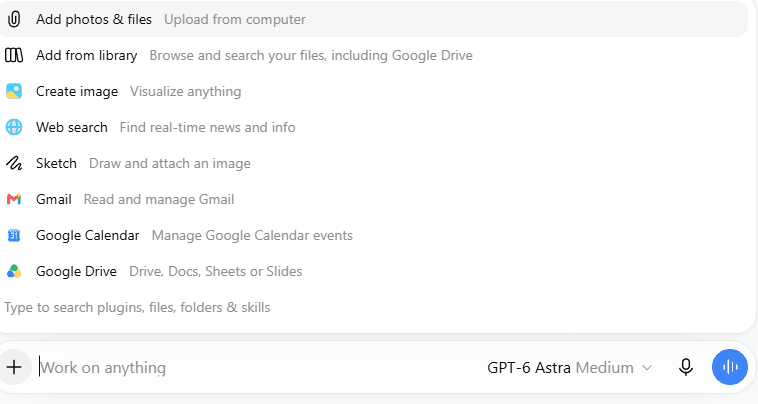
ChatGPT is itself an assistant and can use connected tools through plugins, including MCP-backed capabilities. The screenshot shows Google Drive, Gmail and Calendar connections alongside files and web search. This demonstrates ChatGPT reaching other services; it does not show Claude controlling ChatGPT or establish a universal assistant-to-assistant connection.

ChatGPT connected-service and tool menu

ChatGPT’s connected-service and tool menu

Slidely AI

Slidely AI publishes 17 MCP tools for creating presentations, importing existing PowerPoint files, applying design systems, and continuing work through presentation chats.

Its tools also expose layout selection, slide-batch review, and confirmation of deletions or reordering. The review experience depends on what the connected client supports.

Slidely lists direct ChatGPT access and a remote endpoint for compatible clients. Its one-click Claude connection is still marked as coming soon on the current product page.

Our take

ChatGPT as the broader assistant; Slidely as a presentation tool it can use.

These products can be complementary. ChatGPT can handle broader analysis and call connected tools, while Slidely exposes presentation-specific actions to compatible assistants. We favor Slidely when those dedicated PowerPoint actions are the requirement. Distinguish the assistant hosting the conversation from the service executing the presentation work.

For a one-click Claude connection, check current availability before choosing a client.

Full comparison scorecard

ComparisonChatGPTChatGPTSlidely AISlidely AIStronger fit by use caseBetter
Give AI your source materialUploads, references and connected sourcesReferences plus PPT design sourceBoth support inputs; Slidely when a company PPT is centralTie
Research and enrichResearch and source notes shownSearch and source review in planningChatGPT for broad research; Slidely for slide planningTie
Plan storyline and contentStoryline analysis and conversational planningClarification and slide planningBoth plan; Slidely for repeatable PPT reviewTie
Control design before generationTemplates, visual references and written briefsPowerPoint design-source and layout choicesBoth accept direction; Slidely for layout selectionTie
Create data-dense slidesData tables and source-backed exhibits shownNative PPT exhibits and data objectsSlidely for recurring dense PPT work; quality not rankedSlidely AI
Fast and flexible creationVisible task progress; lengthy iteration in one runParallel chats and notificationsSlidely for presentation task management; no speed rankingSlidely AI
Use your company templateReference-deck and template reuseUploaded PPT design sourceSlidely for reusing company PowerPoint layoutsSlidely AI
Reuse design patternsReusable template demonstratedDesign components and memoriesBoth reuse references; Slidely for PPT-specific componentsTie
Work without a templateMultiple alternative designs generatedDesign starting points and layout toolsChatGPT for alternatives; Slidely for ongoing PPT systemsChatGPT
Edit existing slidesFile revisions and PowerPoint-side editsChat edits to existing PPT contentBoth edit PPT; Slidely for a dedicated workflowSlidely AI
Redesign slidesTargeted repairs and multi-slide redesignConversational and multi-slide editingBoth redesign; Slidely for recurring PPT revisionsTie
Re-template contentThree redesigned versions in the exampleGenerate with a different PPT design sourceSlidely for moving content between PowerPoint design systemsSlidely AI
Review the whole deckLabels, spacing and assumptions reviewedSlide review and checking toolsBoth check consistency; Slidely for routine PPT reviewTie
Find and improve assetsCustom visuals adapted for AustraliaContextual assets within PowerPointChatGPT for custom visuals; Slidely for PPT asset selectionTie
Editable PowerPointEditable content reported; inspect the actual PPTXNative PPT workflow and reconstructionBoth editable; Slidely for continued PPT maintenanceSlidely AI
PowerPoint productivityCSV-to-deck work; dedicated utility suite not shownLayout, checking and Excel-linking utilitiesSlidely for dedicated PowerPoint utilitiesSlidely AI
Platform availabilityWork, PowerPoint and connected Slides workflowsWeb and PPT add-inChatGPT for broader connected work; Slidely for PPT focusChatGPT
Pricing and supportFree and paid access; support not comparedFree plan; tier-specific supportCompare actual tools, limits and support termsTie
Enterprise deploymentWorkspace governance and plan-based identity controlsVPC and organizational LLM optionsAssess controls and deployment separatelyTie
ChatGPT, Claude and MCPAssistant with plugins and MCP-backed toolsPPT editing and review; Claude shortcut pendingComplementary: ChatGPT hosts; Slidely supplies PPT actionsTie
Overall assessmentBroad research, analysis and presentation workOngoing PowerPoint workSlidely for recurring PPT work; ChatGPT for broader tasksSlidely AI
Overall score7.5 / 2012.5 / 20Seven Slidely advantages, two ChatGPT advantages, eleven tiesSlidely AI

The table summarizes the 20 questions for professional PowerPoint teams. It gives ChatGPT credit for demonstrated research, design, editing and review capabilities, while favoring Slidely where a dedicated presentation workflow is the priority. Scoring gives one point for a clear use-case advantage and half a point to each product for a tie: Slidely AI 12.5 / 20; ChatGPT 7.5 / 20. These are PowerPoint-focused editorial scores, not a measured quality, speed or security benchmark.

  • Overall, we lean toward Slidely AI for teams whose presentations stay in PowerPoint through creation, review and revision.

  • ChatGPT is a strong alternative when research, data analysis, visual exploration and deck production belong in one workspace. Slidely’s case is strongest when company PowerPoint design sources, recurring exhibits and maintenance tools are central.

For repeated business PowerPoint work, start by evaluating Slidely. If presentations are one part of a broader connected task, evaluate ChatGPT alongside it using the same brief, template and review criteria.

Which should you choose?

Choose around the work your team repeats most often. We lean toward Slidely for a dedicated business PowerPoint workflow. ChatGPT is a credible alternative for teams that want research, analysis and presentation work together, including editing inside PowerPoint where available.

Choose ChatGPT if…

Choose ChatGPT when the task crosses research, spreadsheets, writing and slide creation, or when you want to explore several visual approaches conversationally. The supplied examples demonstrate template reuse, re-templating, consistency review and localized assets. Confirm which tools your workspace provides, and review the actual deck rather than assuming every generated object is editable.

Choose Slidely AI if…

Choose Slidely AI when you want to build from your own source material, use company or client PowerPoint designs, and keep improving the same deck through review cycles.

Its combination of planning, conversational edits, multi-slide redesign and PowerPoint utilities supports the work that continues after the first draft. That is the central reason we recommend it for business presentations.

For enterprise requirements, discuss deployment and organizational LLM options separately from the standard subscription. Evaluate them against your own security and procurement criteria.

Bottom line

For teams that create and keep editing business PowerPoint decks, Slidely AI is the stronger fit in this 20-question framework: its planning, company design sources and PowerPoint maintenance tools support the full deck lifecycle. Choose ChatGPT when a presentation is part of broader research and analysis, or use the two together through a supported connection.

Before deciding, test the same brief and company template in both, then compare a data update, a redesign and a final review in the actual PowerPoint files. The 12.5–7.5 result reflects these workflow priorities, not a controlled test of slide quality, speed or security.

Try Slidely AI with a deck your team already uses

Start with a copy of an existing presentation in the Slidely PowerPoint add-in. Try one content edit, one layout change and one chart update, then review the result in PowerPoint.

Frequently asked questions

For ongoing business PowerPoint work, we lean toward Slidely AI. Its existing-file editing, company design sources and PowerPoint utilities are well aligned with that workflow. ChatGPT may be the better fit when a deck is part of a broader research and analysis task. Its supplied examples show substantial presentation editing and design work. Our Slidely preference is about a dedicated PowerPoint process, not a claim that ChatGPT only produces outlines.

Make your next deck in PowerPoint

Try Slidely AI with a deck your team already uses

Bring your brief and company template together, then keep refining the slides in PowerPoint.

Explore more comparisons

Still weighing your options? See how other presentation tools compare with Slidely AI.