Plus AI vs Slidely AI, detailed comparison guide [Sep 2026]
Plus AI and Slidely AI are both AI presentation tools built for people who want to create and edit decks faster. On the surface, they overlap in many of the same areas: both can generate presentations, work inside PowerPoint, edit existing slides, use company branding, and produce native, editable output. But the way they approach the presentation workflow is quite different.
Plus AI is built around fast presentation generation and editing across PowerPoint, Google Slides, and the web. Slidely AI is more focused on the end-to-end professional PowerPoint workflow, from combining source material and researching a topic to planning the storyline, working with complex company templates, editing existing decks, and handling enterprise deployment requirements.
To see how they compare, we tested both products across 20 parts of the presentation workflow, including research, storyline creation, slide generation, templates, redesign, PowerPoint editing, native output, platform support, and enterprise features. Below, we’ll walk through where each tool is stronger, where the differences are smaller, and which types of teams each product is best suited for.
Plus AI vs Slidely AI at a glance
 Plus AI Plus AI |  Slidely AI Slidely AI | |
|---|---|---|
| Best for | Fast AI-generated decks across Google Slides and PowerPoint | Professional PowerPoint workflows with complex templates, data, and iteration |
| Where you work | PowerPoint, Google Slides, web | PowerPoint, web |
| Starting from source material | Prompts and uploaded files | Multiple mixed inputs including PPTX, PDF, Excel, documents, and images |
| Storyline and research | AI agent with research and generation | Research, clarification, storyline planning, and slide-level content review |
| Company templates | Custom templates, with additional setup for complex corporate designs | Uses existing PowerPoint templates, masters, and layouts directly |
| AI editing | Rewrite, Remix, and Presentation Agent | Conversational editing, redesign, multi-slide editing, and deck review |
| PowerPoint output | Native editable PowerPoint | Native editable PowerPoint |
| Enterprise | SSO, administration, security, custom templates | SSO, security, private cloud/VPC, bring-your-own LLM |
| Google Slides | Yes | No |
| Free plan | Trial | Permanent free tier |
How we compared Plus AI and Slidely AI
We compared Plus AI and Slidely AI across the full presentation workflow, not just first-draft generation.
That includes how well each tool handles messy source material, research, storyline development, company templates, slide design, editing, re-templating, native PowerPoint output, collaboration, platform support, and enterprise requirements.
For each of the 20 questions below, we looked at what each product actually lets the user do and which workflow is better suited to professional presentation work. Where one product had a clear advantage, it received one point. Where the trade-off was genuinely situational, we scored the category as a tie and gave each product half a point.
The detailed sections below explain the reasoning behind every comparison before we summarize the results in the final scorecard.
Presentation creation
1. How easy is it to give the AI your source material?
2. Can the tool research and enrich the presentation?
3. How well does it plan the storyline and slide content?
4. Can you control the design direction before generation?
5. Can it create high-quality, data-dense slides?
6. How fast and flexible is the creation workflow?
Branding, templates & design
7. Can it use your real company template?
8. Can it learn and reuse your company's design patterns and preferences?
9. Can it help when you do not already have a usable template?
Editing, data & PowerPoint productivity
10. How well can it edit existing slides with AI?
11. How well can it redesign one or multiple slides?
12. Can it re-template slides into a new design system?
13. Can it review and fix consistency across the whole deck?
14. Can it find and improve visual assets?
15. Does it keep everything natively editable in PowerPoint?
16. Does it provide advanced PowerPoint productivity tools?
Platform, user experience & enterprise
17. Where can you use the product?
18. How accessible are pricing and human support?
19. How well does it support enterprise deployment, model control, and security?
20. Can it work with ChatGPT, Claude, and other AI assistants?
Presentation creation
The first part of our comparison looks at everything that happens before a finished deck exists: giving the AI context, researching the topic, developing the storyline, aligning on the design direction, and finally turning all of that into slides.
1. How easy is it to give the AI your source material?
Most presentation work does not start from a clean prompt. Users usually have a mix of inputs: an email from a colleague, a previous presentation, a client PDF, some Excel analysis, a few images, and perhaps a company template. We wanted to see how much of that context we could give each tool upfront, and whether the AI could structure it without forcing us to simplify the problem first.
Plus AI

Plus AI gives users three main ways to start: begin from a text prompt, upload a source file, or configure the presentation slide by slide. Its current upload workflow supports formats including PDFs, Word documents, PowerPoint files, and text files.
This works well when the source material is relatively self-contained. When we wanted to combine several different types of inputs into one brief, however, the workflow felt more constrained. The slide-by-slide option gives more control, but also puts more responsibility for structuring the presentation back on the user.
Slidely AI
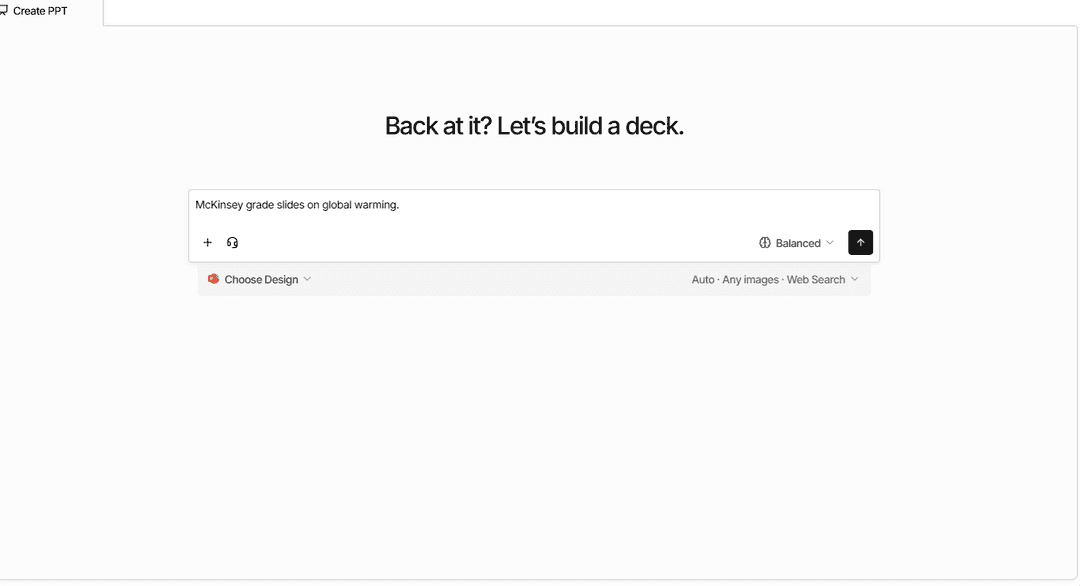
Slidely AI starts with a more general-purpose prompt. We could attach several sources, including presentations, PDFs, documents, spreadsheets, and images, and ask the AI to reason across them together.
We could also provide the company's PowerPoint template alongside the source material, so Slidely had both the content context and design context before it started planning the deck.
Our take
Better: Slidely AI.
Both tools make it easy to start from a prompt or source material. Plus AI works well when the inputs are relatively simple or already structured. Slidely AI is better suited to workflows where the user wants to provide a broader collection of raw material and let the AI help make sense of it.
2. Can the tool research and enrich the presentation?
The files a user provides rarely contain every piece of context needed for a strong presentation. External information can completely change the interpretation of the internal data. A company growing at 20%, for example, looks very different if its market is growing at 10% versus 40%.
We therefore wanted to see whether the AI could go beyond the user's files, find relevant information online, and bring useful evidence back into the presentation.
Plus AI
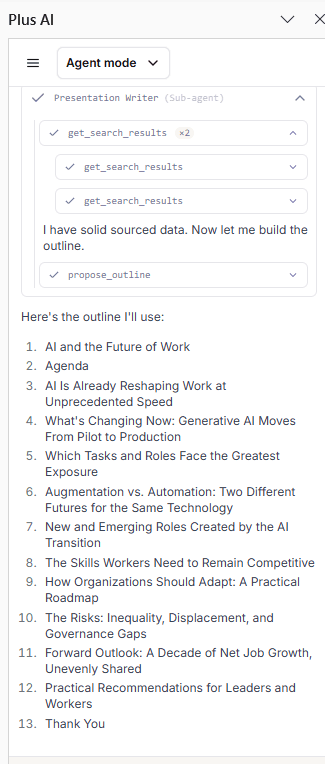
Plus AI's newer Presentation Agent can brainstorm, research, and organize ideas, including helping with market and competitor intelligence.
In our testing, research felt more like a capability of the agent than a dedicated research phase of the deck-building process. Plus can find information to help with a presentation, but there is less emphasis on showing a multi-stage research process before the storyline is finalized.
Slidely AI
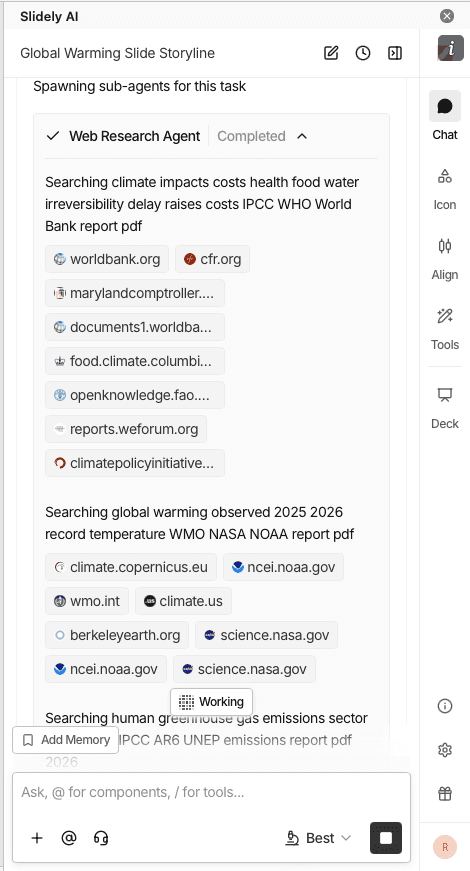
Slidely AI makes web research an explicit part of presentation creation. It can search the web alongside the user's uploaded material and use that research to shape the storyline and individual slides.
The workflow also makes it easier to inspect the information being used before slide generation rather than discovering new external claims only after the deck has been created.
Our take
Better: Slidely AI.
Both products can bring outside information into the presentation. Plus AI's agent is useful for ad hoc research; Slidely AI makes research a more explicit part of the end-to-end process of developing the deck.
3. How well does it plan the storyline and slide content?
A good presentation is not simply a document broken into slides. Before designing anything, the creator needs to decide who the presentation is for, what the audience should take away, how the argument should unfold, and what evidence belongs on each slide.
We wanted to see how much each product helps with that thinking before committing to a finished deck.
Plus AI
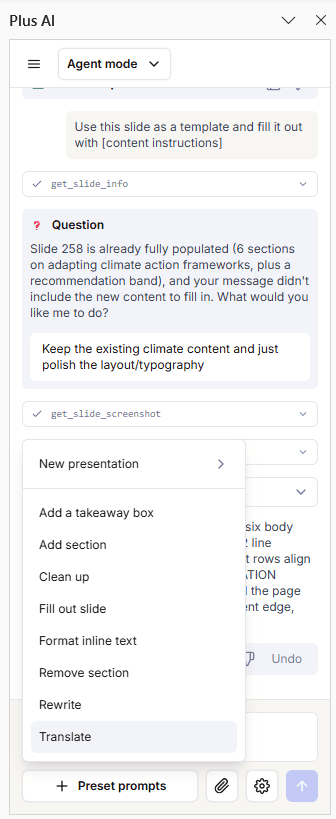
Plus AI's Presentation Agent can plan the story, write the content, and design the presentation from a prompt or an existing deck. Plus AI also supports more structured generation where the user can configure the presentation slide by slide.
The overall experience is optimized for getting from the brief to a usable first draft fairly quickly. Much of the planning happens inside the generation process rather than as a series of explicit checkpoints with the user.
Slidely AI
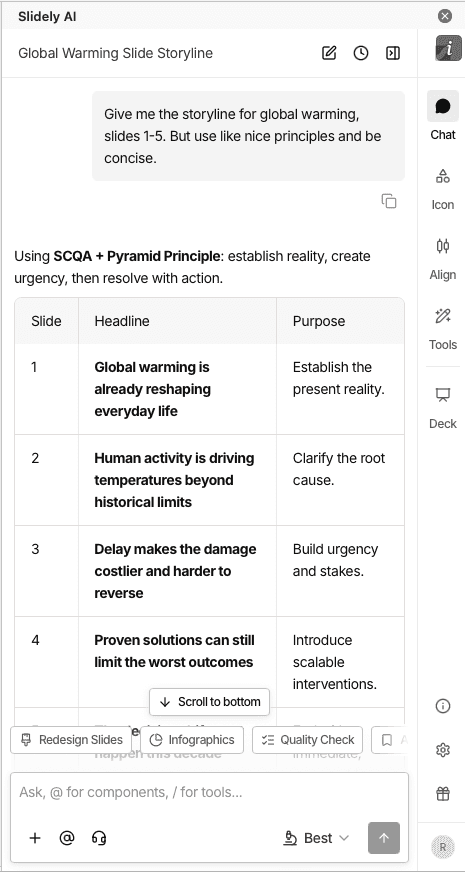
Slidely AI separates more of the planning process from slide generation. It first asks questions to clarify the brief, such as the intended audience and objectives, then develops the storyline and lets the user review the content planned for individual slides.
This creates more opportunities to change the argument before design work begins. Users can refine what belongs in each section and slide rather than waiting for the generated deck to discover whether Slidely interpreted the brief correctly.
Our take
Better: Slidely AI.
Plus AI gets to the first draft more directly. Slidely AI exposes more of the thinking before generation, which is useful when the storyline itself is a significant part of the work.
4. Can you control the design direction before generation?
Even if the storyline and data are correct, there are many ways to visualize the same presentation. Discovering that the AI chose the wrong design direction after generating 30 or 50 slides creates unnecessary rework.
We therefore looked at how much control users have over layouts and visual direction before the full deck gets generated.
Plus AI
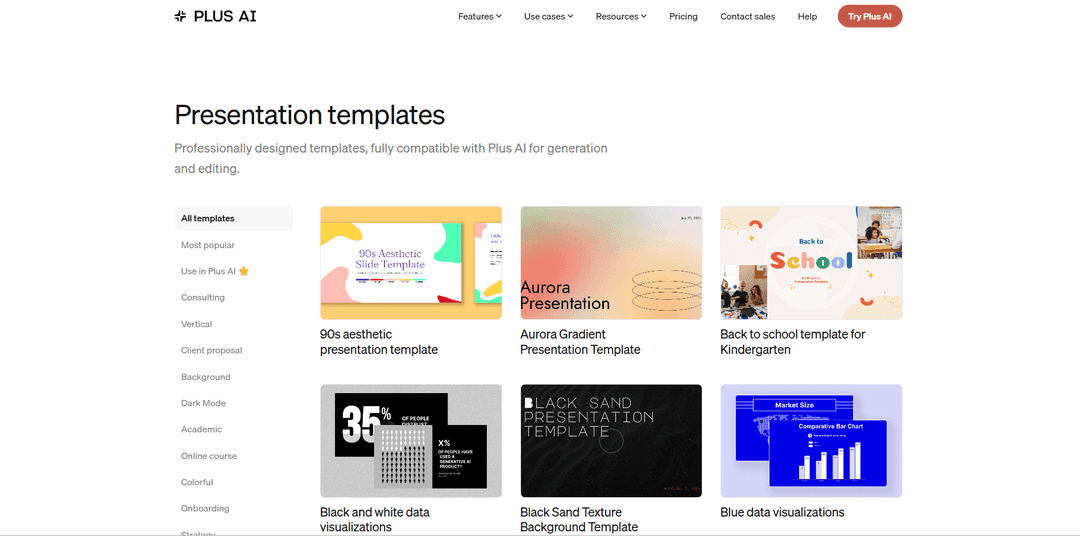
Plus AI has a large library of professional slide designs and can automatically choose layouts based on the content. Users can also choose specific formats and generate variants when they want more control.
This provides good control at the slide level. With complex corporate templates, however, the workflow is still largely about letting Plus choose from the designs available to it rather than explicitly defining a subset of masters and layouts before the deck is built.
Slidely AI
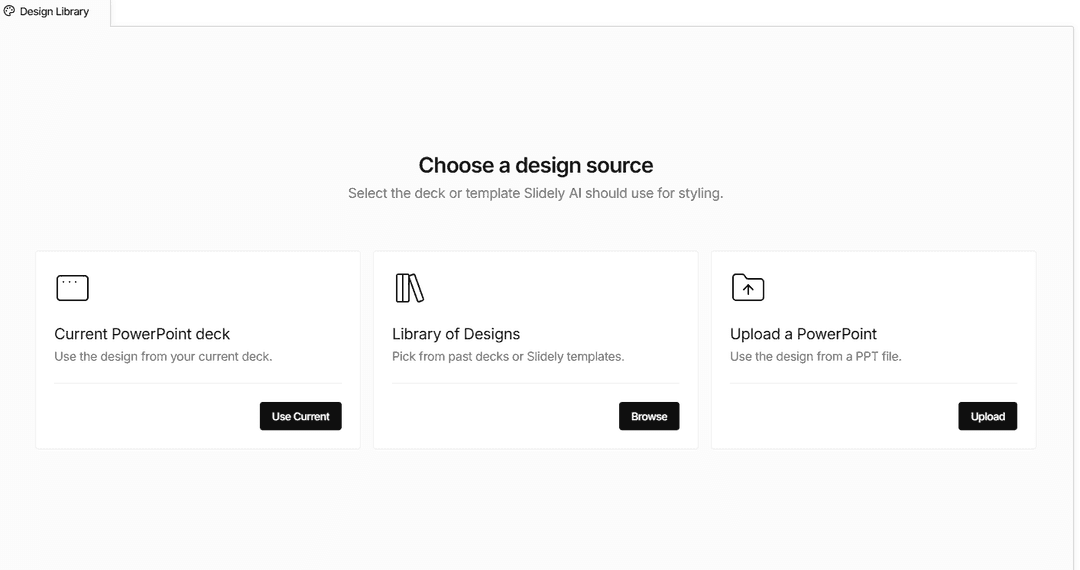
Slidely AI lets users work directly with the layouts inside their PowerPoint template and filter which layouts should be considered for a presentation. It can also recommend layouts based on the content while allowing the user to override those choices.
Before creating the full deck, the workflow can be used to validate slide-level content, layout choices, and sample outputs so that the user and AI are aligned on both content and design.
Our take
Better: Slidely AI.
Plus AI offers strong layout selection and variation during generation and editing. Slidely AI gives more control earlier in the workflow, particularly when the company template contains many different masters and layouts.
5. Can it create high-quality, data-dense slides?
Professional presentations vary enormously in information density. An executive summary might contain one message and a chart; a consulting or financial-analysis slide might contain several charts, a detailed table, annotations, and supporting evidence.
We wanted to see whether the design adapts to the information, or whether the information has to be simplified to fit the design.
Plus AI
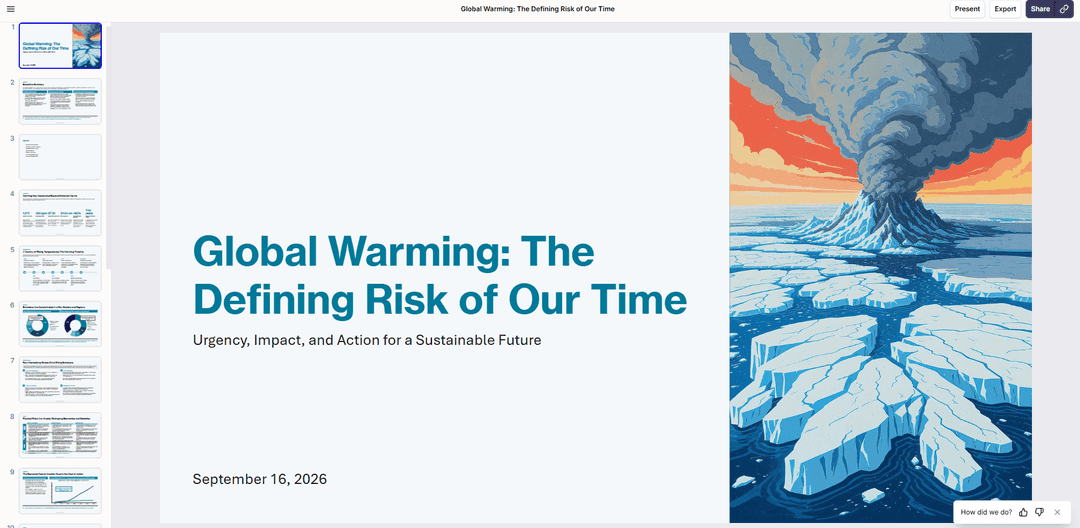
Plus AI creates professional slides from a large library of layouts and supports charts, tables, images, and icons. Charts and tables created by Plus remain editable in PowerPoint and Google Slides.
It works particularly well for quickly turning a clear brief into a polished first draft using established presentation structures.
Slidely AI
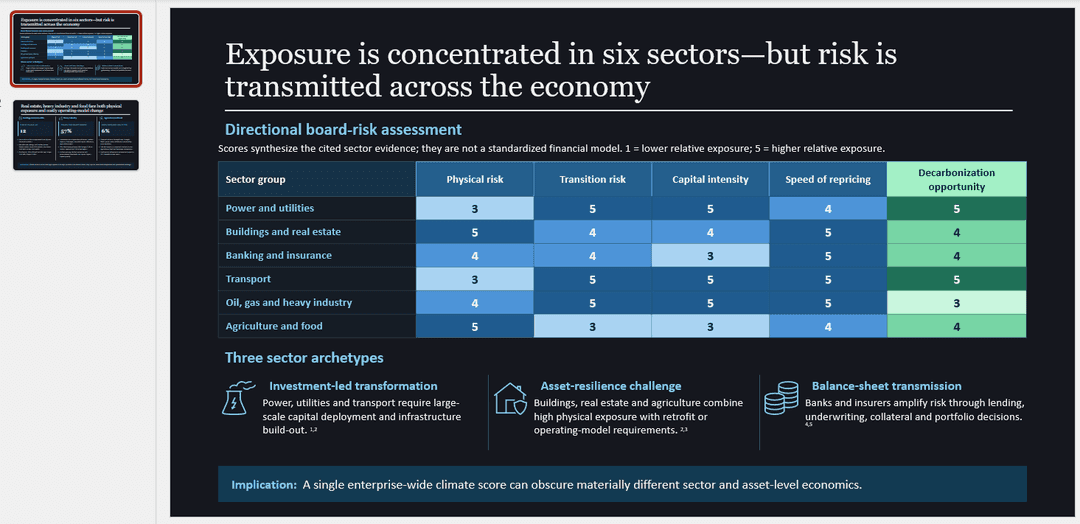
Slidely AI is designed to create simple, medium-density, and highly data-dense slides while keeping the result fully editable. Its examples include data-heavy graphs, tables, complex charts, and slides built directly against PowerPoint master layouts.
Rather than treating a predefined layout as the primary constraint, the workflow is designed around preserving the information the user has decided belongs on the slide and finding an appropriate way to present it.
Our take
Better: Slidely AI.
Both tools can generate professional, editable slides with charts and tables. Slidely AI is more oriented toward complex, information-dense PowerPoint work where preserving the requested content takes priority over fitting it into a standard slide pattern.
6. How fast and flexible is the creation workflow?
Generating a long presentation still takes time with any AI system. What matters is not only the absolute generation time, but whether the product keeps the user blocked while work is happening.
We looked at whether users can continue with other tasks, run work in parallel, and get notified when longer operations finish.
Plus AI
Plus AI typically generates a first draft in a few minutes. Its web experience lets users leave the generation screen and return later, and its API and MCP workflows support asynchronous runs that can be checked after they finish.
The core product experience is still more centered around individual generation or editing operations.
Slidely AI
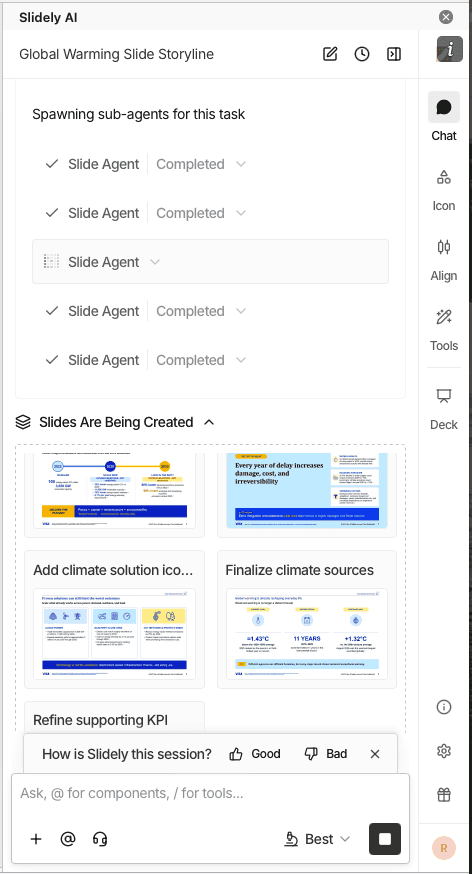
Slidely AI creates slides in parallel rather than waiting for one slide to finish before starting the next. It also supports multiple chat threads, allowing the user to work on different presentation tasks simultaneously.
For longer operations, Slidely has slide-completion and presentation-completion notifications so users do not need to keep watching the generation screen.
Our take
Better: Slidely AI.
Both products let users step away from longer generation tasks. Slidely AI goes further in treating presentation work as several parallel workstreams rather than one sequential interaction with the AI.
Branding, templates & design
Once the content is right, the next question is whether the output actually looks like it belongs to the company creating it.
For professional teams, branding is not just a logo, two colors, and a font. It is encoded in PowerPoint masters, layouts, reusable slide patterns, components, and hundreds of smaller design choices accumulated over time.
7. Can it use your real company template?
Many teams already have a professionally designed PowerPoint template. They do not need the AI to create a new design system; they need it to work correctly inside the one they already use.
We therefore looked at how easily each product can adopt an existing company or client template.
Plus AI

Plus AI supports custom branding on its Team plan and custom templates for more advanced workflows. Enterprise customers can use their organization's actual slides and slide masters, with Plus AI offering white-glove template conversion for complex designs.
The trade-off is setup. A normal PowerPoint template does not automatically work with Plus AI's designer out of the box, and complex Enterprise templates typically go through a conversion process.
Slidely AI
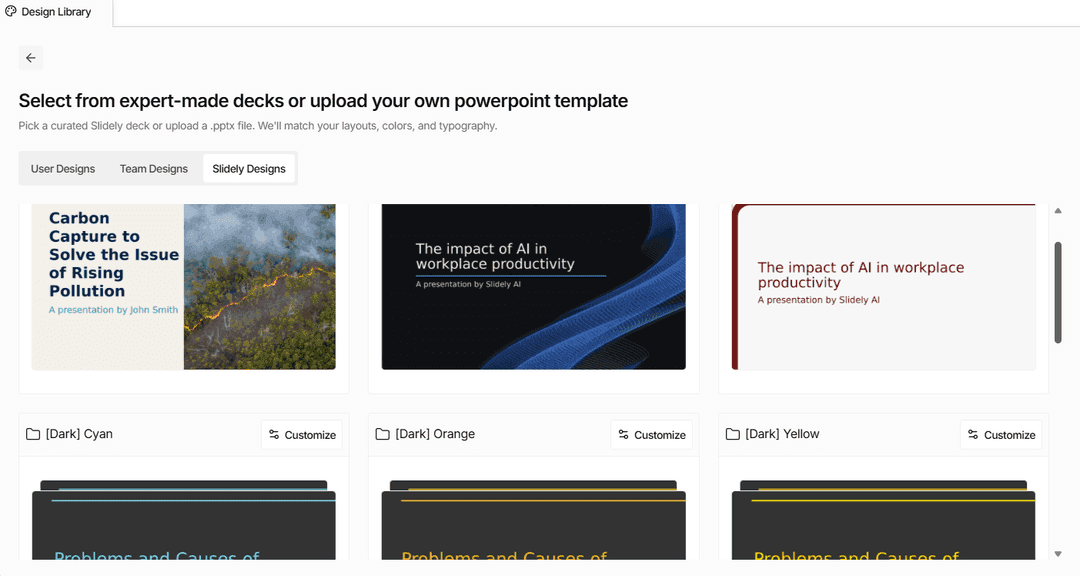
Slidely AI lets users upload an existing .pptx directly and use it as the design source. It reads the presentation's existing layouts, fonts, tables, charts, and other styling and uses them when generating new slides.
This makes the workflow closer to "give the AI the deck we already use" rather than first converting that deck into a separate AI template system.
Our take
Better: Slidely AI.
Both products support real corporate templates. Plus AI has a mature Enterprise template-conversion offering; Slidely AI offers a more direct workflow for using an existing PowerPoint deck as the design source.
8. Can it learn and reuse your company's design patterns and preferences?
A formal template only captures part of how a company actually designs slides. Teams also reuse KPI cards, table styles, timelines, process diagrams, chart treatments, section patterns, and dozens of other components that may never appear as formal PowerPoint layouts.
At the same time, individual users develop their own preferences about which patterns they like to use.
Plus AI
Plus AI supports custom instructions and presets that let users save context for future generations. Team and Enterprise offerings also include shared preset libraries, custom templates, and integrations with existing slide and asset libraries.
This gives organizations a way to encode repeatable presentation patterns into Plus AI rather than starting from scratch each time.
Slidely AI
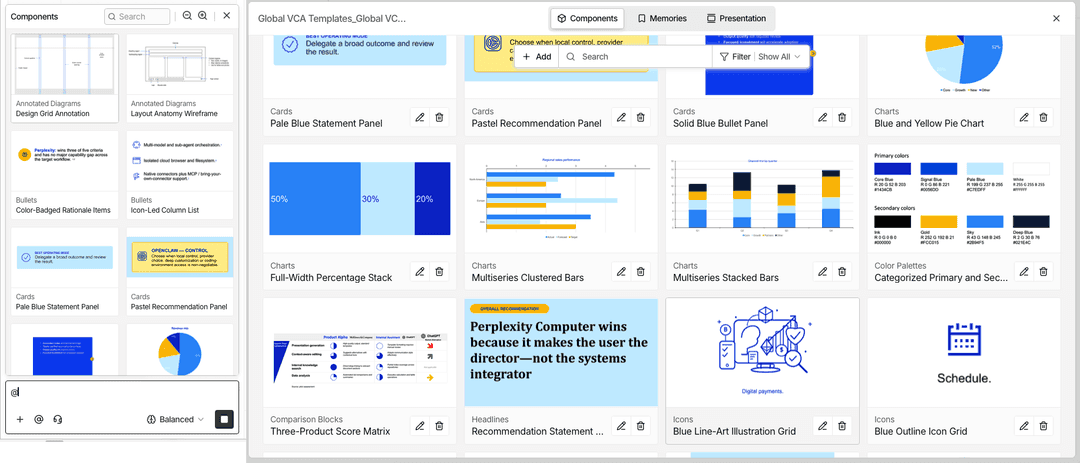
Slidely AI approaches this through both reusable design components and design memories. Components can be extracted from existing slides and reused in new compositions, while scoped design memories let Slidely retain preferences that should carry into later work.
This allows the AI to learn not just from an organization's formal template, but from the actual visual patterns and choices its users repeatedly make.
Our take
Better: Slidely AI.
Plus AI provides strong libraries, presets, and organization-level customization. Slidely AI puts more emphasis on learning from the actual slides and edits a user already makes, then reusing those patterns inside future work.
9. Can it help when you do not already have a usable template?
Sometimes there is no editable company template to begin with. A team might be pitching a prospect and only have the prospect's website, a PDF report, or a few public presentations as visual references.
In that case, the problem changes from "use this template" to "help me create a usable design system from the references I have."
Plus AI
Plus AI provides a library of professionally designed preset templates that users can customize with their own logo, colors, and fonts.
For Enterprise customers, Plus AI also offers white-glove template conversion and design services when a company needs a more specialized template built for its use case.
Slidely AI
Slidely AI also provides preset templates for users who simply want to pick a design and begin.
When the only reference is a PDF or other branded material, Slidely can additionally use those materials, alongside web research, to infer the visual language and create the PowerPoint masters, layouts, assets, colors, and typography needed for the presentation.
Our take
Tie.
The products are strong in different versions of this problem. Plus AI offers a polished preset library and a services-assisted route for custom Enterprise templates. Slidely AI is better suited to the more ad hoc case where the user wants the AI itself to reconstruct a PowerPoint design system from imperfect reference material.
Editing, data & PowerPoint productivity
The first draft is only the beginning of most professional presentation workflows. Teams spend far more time reviewing slides, incorporating feedback, moving content into new templates, fixing formatting, and updating the deck as the underlying thinking changes.
So we also tested how useful each product remains after a presentation already exists.
10. How well can it edit existing slides with AI?
The most useful presentation AI should not require users to regenerate a slide whenever something changes. It should understand what is already there, modify only what the user asks for, and preserve the rest.
We also wanted the user to stay in control of significant edits rather than having the AI silently rewrite a carefully reviewed slide.
Plus AI
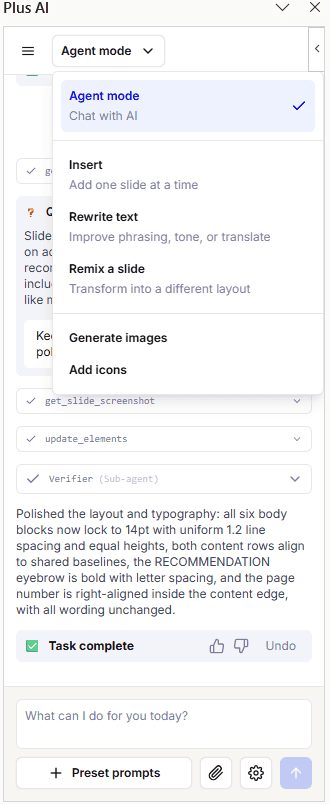
Plus AI provides several ways to edit existing work. Rewrite can change or improve text, Remix can reformat a slide into another layout, and the newer Presentation Agent accepts free-form instructions for tasks such as filling in slides, cleaning formatting, researching information, and modifying content.
This is a substantial improvement over Plus AI's earlier, primarily action-based editing workflow.
Slidely AI
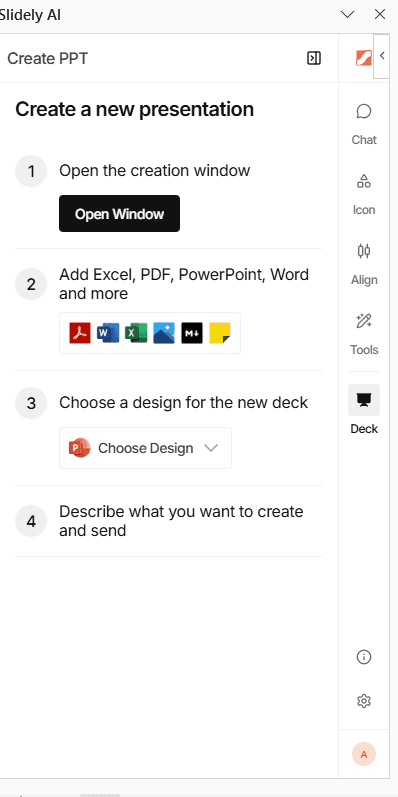
Slidely AI's editing experience is built around a conversational agent working on the existing PowerPoint. Users can ask for anything from a small copy change to a more complex chart or layout edit, review the result, refine it in chat, and then apply the final change.
It also supports selecting specific PowerPoint objects as context and giving more precise instructions about what should and should not change.
Our take
Better: Slidely AI.
Both products now support meaningful AI editing inside existing presentations. Plus AI combines structured actions with an increasingly capable agent; Slidely AI provides a more granular conversational workflow for repeatedly iterating on an existing slide.
11. How well can it redesign one or multiple slides?
Often the content is already correct and the problem is visual. A user might want to improve hierarchy, make the slide more visual, simplify the layout, or bring several inconsistent slides closer to the same design language.
We wanted to see whether each product could explore alternatives without forcing the user to rewrite the underlying content.
Plus AI
Plus AI's Remix feature is built specifically for reformatting existing slides. Users can transform a single slide into a chosen layout, generate variants, or Remix an entire presentation.
This makes Plus AI particularly straightforward when the desired redesign maps well to one of the available slide formats.
Slidely AI
Slidely AI handles redesign as an open-ended editing task. Users can ask for a new visual direction in natural language, generate alternatives, refine a chosen direction, or redesign several slides while keeping the set consistent.
Slidely also provides more precise redesign controls, allowing users to constrain what the AI should preserve while changing the visual treatment.
Our take
Tie.
Plus AI's Remix is fast and easy to understand, especially when the user knows the type of layout they want. Slidely AI provides more flexibility when the desired redesign cannot be described as simply moving the content into another predefined format.
12. Can it re-template slides into a new design system?
Moving slides from one template into another is common in professional work. Consultants move internal analysis into a client template, sales teams adapt corporate slides to account-specific decks, and companies periodically roll out entirely new brand systems.
A theme swap is rarely enough. The slide usually needs to be reinterpreted using the new template's layouts, typography, spacing, colors, and visual patterns.
Plus AI
Plus AI can reformat existing slides through Remix and its Presentation Agent can restyle existing decks. Its MCP workflow also supports handing the agent an existing PowerPoint and asking it to apply different branding or continue iterating on the same file.
For the strongest results with proprietary company designs, Plus recommends configuring the corresponding custom template in Plus AI.
Slidely AI
Slidely AI can use the same content with a different uploaded PowerPoint template, mapping the presentation into the new template's slide masters and layouts.
The goal is not simply to replace the theme properties. Slidely can also adapt the composition when the original slide does not translate cleanly into the new design system.
Our take
Better: Slidely AI.
Both tools can restyle existing presentations. Slidely AI is more explicitly designed for the common PowerPoint workflow of moving existing slide content from one real corporate template into another.
13. Can it review and fix consistency across the whole deck?
A deck can contain individually good slides and still feel unfinished. Fonts vary slightly, similar charts use different colors, terminology changes from one section to another, or an object overlaps something on slide 27 that nobody noticed.
We wanted to see whether the AI could reason beyond one slide at a time and help with the final quality-control pass.
Plus AI
Plus AI's Presentation Agent can help clean up formatting and make broader changes to an existing presentation. Because it works against the current deck, users can also ask it to improve or standardize presentation content rather than only generating new slides.
Plus AI's public product experience is less centered around a dedicated presentation-checking workflow, however.
Slidely AI
Slidely AI includes dedicated slide-review and checking functionality alongside its editing agent. It can surface visual and editorial issues and then use AI editing to fix them.
The same workflow can be used to improve consistency across groups of slides rather than treating every slide independently. Through MCP, the user can also inspect proposed layouts, review generated slide batches, request revisions, and confirm consequential actions such as deleting or reordering slides before they are applied.
Our take
Better: Slidely AI.
Plus AI can help clean up a deck through its general-purpose agent. Slidely AI provides more purpose-built review tooling for users who want the product to actively inspect a presentation before it is shared.
14. Can it find and improve visual assets?
Finding the right image, icon, flag, map, or logo is a surprisingly large part of slide creation. It is also common for the first suggested visual not to be quite right.
We wanted to see whether the tools could not only add assets, but help users search, compare, replace, and iterate on them without leaving the presentation workflow.
Plus AI
Plus AI can add and generate images and icons directly within the presentation workflow. Enterprise customers can also connect existing asset libraries, including approved images, icons, and resource slides.
This is particularly useful for organizations that already maintain a curated collection of brand-approved assets.
Slidely AI
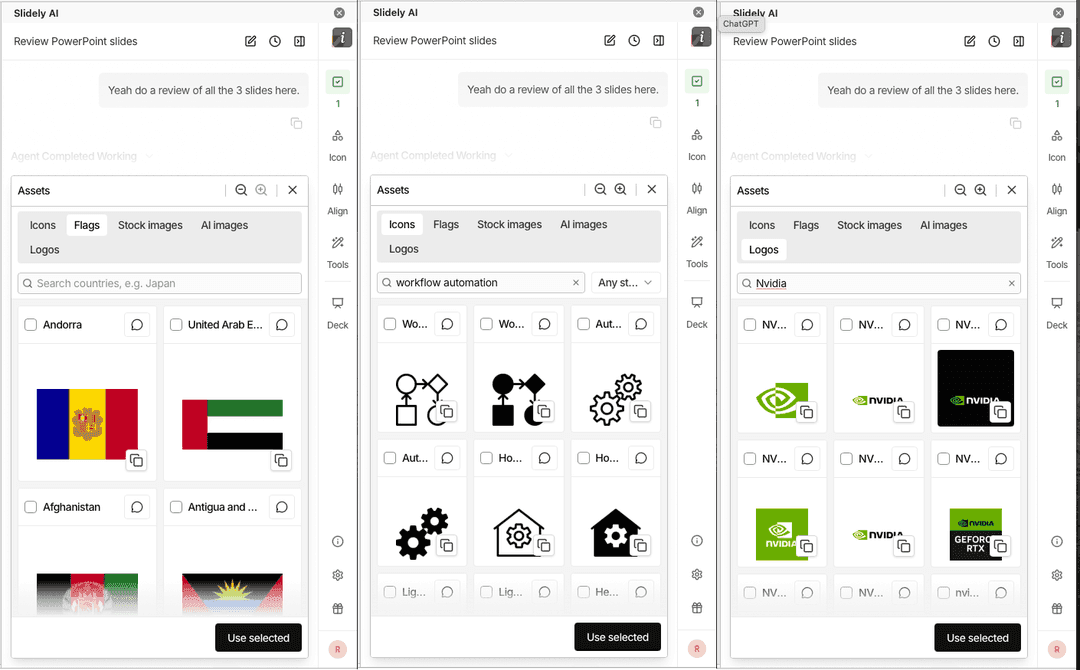
Slidely AI includes contextual AI asset suggestions inside its PowerPoint add-in. It can work with icons, images, logos, flags, maps, and AI-generated visuals, and users can iterate on the asset without leaving the slide workflow.
This makes asset discovery part of the normal editing process rather than a separate search-and-download workflow.
Our take
Tie.
Both products reduce the need to search manually for visuals. Plus AI has a strong Enterprise story around connecting curated asset libraries; Slidely AI focuses more on an in-workflow asset agent for discovering and iterating on visuals while building the slide.
15. Does it keep everything natively editable in PowerPoint?
For professional users, a slide is only useful if they can keep working with it after the AI is done. A chart needs to behave like a chart, a table like a table, and text like normal editable PowerPoint text.
This is an area where both products differ significantly from AI presentation tools that generate HTML or flatten slides into images before exporting to .pptx.
Plus AI
Plus AI generates native PowerPoint files. Its slides remain editable, and its current PowerPoint workflow supports native charts and tables rather than simply rendering the finished slide as an image.
Native PowerPoint compatibility is one of Plus AI's strongest capabilities.
Slidely AI
Slidely AI similarly creates presentations as native PowerPoint objects, including text, shapes, charts, and tables. Its creation workflow emphasizes fully editable PowerPoint output rather than conversion from a proprietary presentation format.
Slidely additionally supports reconstructing slides from images, screenshots, and PDFs into editable PowerPoint content rather than simply placing the original image on the slide.
Our take
Tie.
This is a strength of both products. If the primary requirement is native PowerPoint output, both Plus AI and Slidely AI clear that bar. Slidely AI extends the idea further into workflows that reconstruct non-editable source material as editable slides.
16. Does it provide advanced PowerPoint productivity tools?
Not every presentation task needs an AI agent. Experienced PowerPoint users also spend hours on repetitive mechanical work: aligning objects, normalizing spacing, fixing tables, updating linked data, and applying the same formatting operation across several elements.
We wanted to see whether each product also helps with these smaller, everyday jobs.
Plus AI
Plus AI's productivity tooling is primarily AI-driven. Rewrite, Remix, Insert, and the Presentation Agent handle many common editing and formatting tasks without requiring the user to manipulate each object manually.
The product is less focused on providing a separate suite of traditional PowerPoint power-user utilities.
Slidely AI
Alongside its AI agents, Slidely AI includes tools such as Auto Layout, Excel linking, slide checking, and additional formatting controls inside the PowerPoint add-in.
These are aimed at the smaller tasks that still consume significant time for heavy PowerPoint users, including alignment, spacing, tables, data updates, and repeated formatting operations.
Our take
Better: Slidely AI.
Plus AI approaches productivity primarily through AI actions. Slidely AI combines AI editing with a broader set of PowerPoint-specific utilities, which is useful for users who spend a large portion of their day directly manipulating slides.
Platform, user experience & enterprise
The final part of the comparison is less about an individual slide and more about whether the product fits the environment in which the team works.
That includes the presentation applications it supports, how easy it is to evaluate and buy, and whether larger organizations can deploy it within their security and AI infrastructure.
17. Where can you use the product?
The right platform depends heavily on where the team already builds presentations. Some organizations live entirely in PowerPoint; others rely on Google Slides; and increasingly, users also expect to start work in a browser.
Plus AI
Plus AI works directly inside both PowerPoint and Google Slides. Its PowerPoint add-in supports current versions of both Windows and Mac PowerPoint.
Plus AI also provides a browser experience for generating presentations. The web app currently focuses on creation rather than full editing, so users export the presentation to PowerPoint or use the PowerPoint or Google Slides add-in for more extensive editing.
Slidely AI
Slidely AI works on the web and inside PowerPoint, with add-in support for both Windows and Mac.
Slidely does not currently provide a Google Slides add-in, so teams whose day-to-day presentation workflow is centered on Google Slides have a clearer reason to choose Plus AI.
Our take
Better: Plus AI.
Plus AI has broader presentation-platform coverage because it supports both PowerPoint and Google Slides. Slidely AI is more specifically focused on professional PowerPoint workflows while also providing a web experience.
18. How accessible are pricing and human support?
Presentation software is difficult to evaluate from a marketing page. Users need to test it with their own slides, their own templates, and their own real-world editing tasks.
We therefore looked at both how easily someone can evaluate the product and what happens when they need actual help.
Plus AI
Plus AI offers an entry-level paid plan and a time-limited trial for users who want to evaluate its paid functionality before committing.
Plus also provides a Help Center and email support, with higher-touch support and onboarding available on higher-tier plans.
Slidely AI
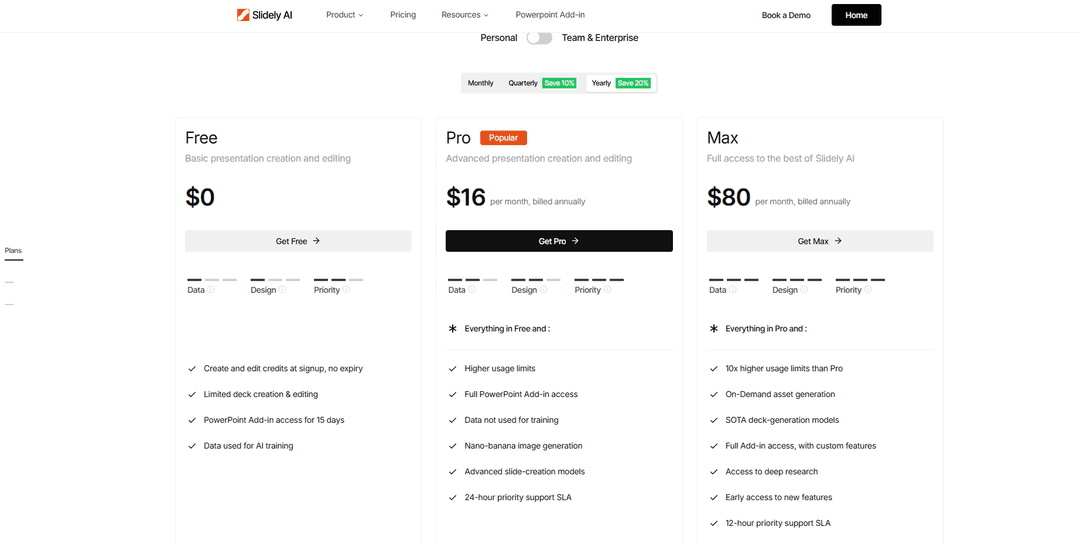
Slidely AI has a permanent free tier with credits that do not expire, although some PowerPoint add-in capabilities are available as time-limited trials on the free plan.
Paid plans add defined support SLAs, while higher organizational tiers include onboarding and account-management options.
Our take
Tie.
Plus AI has a lower-friction route into its paid product and a conventional full-featured trial. Slidely AI provides a permanent free starting point and more explicit human-support options on paid tiers. Which is more attractive depends on whether the user values lower paid entry pricing or ongoing free access.
19. How well does it support enterprise deployment, model control, and security?
For a large organization, presentation features are only one part of the procurement decision. Security teams may care just as much about where data is processed, what model infrastructure is used, whether the product can run in a private environment, and how employees are administered.
Plus AI
Plus AI is SOC 2 Type II compliant, encrypts data in transit and at rest, and provides enterprise capabilities including SSO, user management, custom templates, asset libraries, and white-glove onboarding.
Its Enterprise offering covers the core security, governance, and administration requirements expected by many organizations.
Slidely AI
Slidely AI is also SOC 2 Type II certified and GDPR compliant. Its Enterprise offering adds deployment options such as private cloud and VPC deployments across major cloud providers, alongside customer-specific networking.
Organizations can also connect Slidely to their own LLM endpoints or AI gateway so sensitive presentation content can remain inside the customer's approved infrastructure.
Our take
Better: Slidely AI.
Both products provide the security foundations required by many enterprise customers. Slidely AI offers more infrastructure and model-control options for organizations that require private deployment or want presentation AI to run through their existing AI gateway.
20. Can it work with ChatGPT, Claude, and other AI assistants?
More presentation work is beginning upstream in general-purpose AI tools. A user might research an industry in ChatGPT, analyze documents in Claude, or build an internal agent and then want that system to create or update a presentation.
MCP makes it possible for presentation software to become part of these broader AI workflows rather than requiring every task to begin inside the presentation application itself.
Plus AI
Plus AI provides a remote MCP server that works with ChatGPT, Claude, and other MCP-compatible clients.
Its MCP exposes three high-level tools: one for fast presentation generation, one for running the full Presentation Agent, and one for checking the status of longer-running jobs. The Presentation Agent can start from a prompt or an existing PowerPoint, then continue iterating on that same presentation across multiple turns.
Plus AI also supports native PowerPoint and Google Slides workflows through its broader platform.
Slidely AI
Slidely AI provides a remote MCP server with 17 purpose-built presentation tools. It can create presentations, import and improve existing PowerPoint files, work with real PowerPoint templates and design systems, create multiple presentation chats, and retrieve the results of longer-running operations.
A major difference is that Slidely also exposes the review process through MCP. The user can inspect proposed layouts and generated slides, approve or request revisions to slide batches, and explicitly confirm destructive actions such as deleting or reordering slides before they are applied.
Slidely works directly with ChatGPT today and provides a generic remote MCP endpoint for other compatible clients. A one-click Claude connection is listed as coming soon.
Our take
Tie.
Both products now provide serious MCP implementations rather than simple one-shot presentation generators.
Plus AI currently has an advantage in breadth of ready-to-use client and platform support, including direct Claude support and Google Slides. Slidely AI exposes a broader set of presentation-specific tools and gives the user more explicit control over layouts, slide review, design systems, and consequential changes.
Which implementation is better depends on whether you value broader client compatibility or deeper control over the PowerPoint workflow.
Full comparison scorecard
| Comparison | Plus AI | Slidely AI | Better |
|---|---|---|---|
| Give AI your source material | Good for prompts and individual source files | Handles broader, mixed source material together | |
| Research and enrich the presentation | Agent can research the web | Research is built into the presentation-planning workflow | |
| Plan storyline and slide content | Moves quickly from brief to first draft | Clarifies context, develops storyline, then plans individual slides | |
| Control design before generation | Strong layout library and variants | Control layouts, slide content, and sample outputs before full generation | |
| Create data-dense slides | Strong professional first drafts | Better suited to dense, complex, data-heavy slides | |
| Fast and flexible creation | Fast generation with asynchronous workflows | Parallel slide creation, chats, and completion notifications | |
| Use your company template | Supports custom and Enterprise templates, with setup | Uses existing PowerPoint files directly as the design source | |
| Learn design patterns and preferences | Presets, instructions, templates, and libraries | Components plus design memories learned from existing work | |
| Work without an existing template | Preset templates and Enterprise design services | Presets plus AI reconstruction from PDFs and other references | Tie |
| Edit existing slides with AI | Rewrite, Remix, and Presentation Agent | Granular conversational editing with precise slide/object context | |
| Redesign slides | Strong Remix workflow and variants | Open-ended redesign, alternatives, and multi-slide workflows | Tie |
| Re-template existing slides | Can restyle decks using custom templates | Maps existing slides into another PowerPoint design system | |
| Review the whole deck | General-purpose agent can clean up slides | Dedicated slide review plus deck-wide consistency workflows | |
| Find and improve assets | AI assets plus Enterprise asset libraries | Contextual asset search, suggestions, and iteration | Tie |
| Native editable PowerPoint | Native, editable PowerPoint output | Native, editable PowerPoint output plus reconstruction from images/PDFs | Tie |
| PowerPoint productivity tools | Primarily AI-driven editing tools | AI plus alignment, formatting, Excel linking, checking, and other utilities | |
| Platform availability | PowerPoint, Google Slides, and web | PowerPoint and web | |
| Pricing and support | Lower paid entry point and time-limited trial | Permanent free tier plus direct support options | Tie |
| Enterprise deployment and security | Strong Enterprise security and administration | Adds private cloud/VPC and bring-your-own AI infrastructure | |
| ChatGPT, Claude, and MCP | Remote MCP with multi-turn editing, async runs, and broad client support | 17 purpose-built tools with stateful editing, design systems, and interactive review controls | Tie |
| Overall score | 4 / 20 | 16 / 20 | |
Using these 20 questions as the evaluation framework, with one point for a clear advantage and half a point each for ties:
- Slidely AI: 16 / 20
- Plus AI: 4 / 20
The score reflects this specific evaluation framework, which is intentionally focused on professional PowerPoint workflows. Teams that place more weight on Google Slides or lower paid entry pricing may reach a different conclusion.
Which should you choose?
Both Plus AI and Slidely AI are capable presentation tools, but they are optimized for somewhat different workflows.
Choose Plus AI if...
Plus AI is the better fit if Google Slides is an important part of your workflow, you want a straightforward way to generate polished first drafts, or you want to work fluidly across both Google Slides and PowerPoint.
Its Presentation Agent and MCP integration also make it a strong option for teams building presentation generation into broader AI workflows.
Choose Slidely AI if...
Slidely AI is the better fit if PowerPoint is your primary presentation environment and you work with complex company or client templates, dense data, existing slides, or presentations that require significant iteration after the first draft.
It is also better suited to teams that want the AI involved earlier in the thinking process, through research, clarification, storyline development, and slide-level planning, and later in the workflow through redesign, re-templating, deck review, and PowerPoint productivity tools.
For larger organizations, Slidely AI also provides additional deployment and model-control options such as private cloud, VPC deployment, and bring-your-own LLM infrastructure.
Bottom line
Plus AI has broader platform coverage, particularly for teams that rely on Google Slides. Slidely AI is more complete for professional PowerPoint workflows where the presentation needs to remain deeply editable, follow an existing design system, and continue evolving well beyond the initial generation step.
Frequently asked questions
Is Slidely AI better than Plus AI?
It depends on the workflow. In our comparison, Slidely AI performed better across more of the criteria relevant to professional PowerPoint work, including complex templates, storyline planning, data-dense slides, editing, re-templating, deck review, and enterprise deployment.
Plus AI has an advantage in Google Slides support. We score MCP as a tie: Plus AI has broader ready-to-use client support, while Slidely AI provides deeper presentation-specific tools and review controls.
Is Plus AI better for Google Slides?
Yes. Plus AI works directly inside Google Slides as well as PowerPoint, while Slidely AI is primarily focused on PowerPoint and web-based workflows.
If Google Slides is your team's main presentation environment, this is one of the strongest reasons to choose Plus AI.
Which tool is better for PowerPoint?
For the workflows we tested, Slidely AI is better suited to teams that use PowerPoint as their primary presentation environment, particularly when they rely on company templates, native PowerPoint objects, complex editing, data-heavy slides, or repeated iteration.
Plus AI also works natively in PowerPoint and produces editable PowerPoint files.
Can both Plus AI and Slidely AI use company templates?
Yes, but the workflows differ.
Plus AI supports custom templates and Enterprise template setup. Slidely AI can use an existing PowerPoint presentation directly as the design source, including its masters and layouts.
This makes Slidely particularly useful when teams already have complex PowerPoint templates they want the AI to work within.
Do both tools create editable PowerPoint presentations?
Yes. Both Plus AI and Slidely AI create native, editable PowerPoint output rather than simply exporting screenshots of AI-generated slides.
Slidely AI additionally supports workflows such as reconstructing screenshots, PDFs, and other non-editable slide references into editable PowerPoint objects.
Which tool is better for editing existing presentations?
Both tools can edit existing slides.
Plus AI provides features such as Rewrite, Remix, and its Presentation Agent. Slidely AI uses a more conversational editing workflow that supports precise changes, redesigns, multi-slide edits, deck review, and re-templating.
For deeper iteration on existing PowerPoint decks, Slidely AI performed better in our comparison.
Which tool is better for company branding?
Both tools support branded presentations.
Plus AI supports custom branding, templates, shared presets, and Enterprise template configuration. Slidely AI works directly with PowerPoint masters and layouts and can also learn reusable components and design preferences from existing presentations.
Slidely AI is therefore better suited to workflows where the company's existing PowerPoint design system needs to be preserved closely.
Can both tools research information for a presentation?
Yes. Both Plus AI and Slidely AI can use web research when developing presentation content.
The difference is primarily in the workflow. Plus AI exposes research through its Presentation Agent, while Slidely AI makes research a more explicit part of the process before the storyline and slide content are finalized.
Which tool is better for enterprise teams?
Both products offer enterprise security and administration features.
Slidely AI provides additional infrastructure options such as private cloud and VPC deployment and the ability to connect to an organization's own LLM endpoint or AI gateway. These options can matter for organizations with stricter security, data residency, or model-governance requirements.
Does Slidely AI support Google Slides?
No. Slidely AI is focused on PowerPoint and its web experience.
Teams that need native Google Slides support should consider Plus AI.
Do Plus AI and Slidely AI work with ChatGPT and Claude?
Yes. Both products provide remote MCP servers that allow external AI assistants and agents to create and work with presentations.
Plus AI exposes a smaller set of high-level tools for creating presentations, running its Presentation Agent, and managing asynchronous jobs. It supports multi-turn editing and broader out-of-the-box client compatibility, including direct Claude support.
Slidely AI exposes 17 presentation-specific tools covering creation, existing-deck editing, PowerPoint design systems, multiple chats, layout selection, slide review, and approval of consequential changes. ChatGPT is supported directly today, while a one-click Claude connection is listed as coming soon; other compatible clients can connect through its generic MCP endpoint.
We scored this category as a tie: Plus AI currently has broader out-of-the-box client support, while Slidely AI provides deeper presentation-specific control through MCP.
Is there a free version of Plus AI or Slidely AI?
Slidely AI offers a permanent free tier. Plus AI offers a time-limited trial rather than an ongoing free plan.
The paid plans and included usage differ, so teams should also compare current pricing based on the amount of presentation generation and editing they expect to do.